
View Configuration Deployment History for a Lasernet Core Environment
- 02 Apr 2026
- 1 Minute to read
- Contributors


- Print
- PDF
View Configuration Deployment History for a Lasernet Core Environment
- Updated on 02 Apr 2026
- 1 Minute to read
- Contributors
- Print
- PDF
Article summary
Did you find this summary helpful?
Thank you for your feedback
Applies to: Lasernet Core 11
To view the deployment history for an environment, follow these steps.
Manage
In the side menu, click System Configuration (see 1 in the image below).
On the Environments tab, click the tile (2) for the Lasernet Core environment whose deployment history you want to view.
In the properties pane for the environment, scroll to the Deployment History area (3).
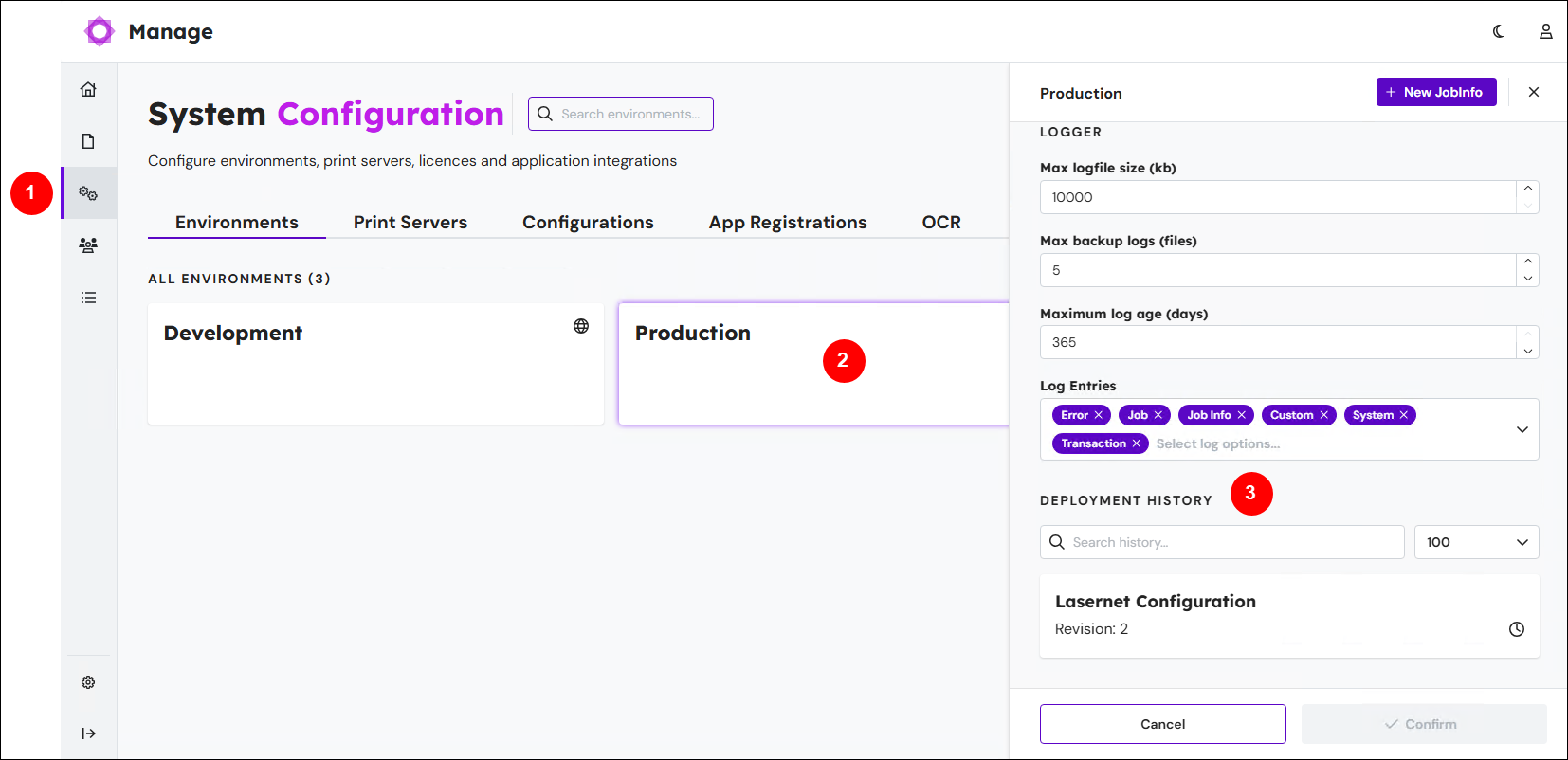
Each item in the Deployment History area represents a configuration deployment to that environment. As this is a history list, the most recent deployment is at the top of the list.
Each item in the history provides the name and revision of the deployed configuration. For the timestamp and the name of the user who did the deployment, hover the mouse pointer over the clock icon.
The Search history box enables you to find specific deployment actions in the history. The number list enables you to control how many items are displayed.
Lasernet Config Web App
Note
The Lasernet Config web app was provided with earlier versions of Lasernet Core. It is a legacy web app and will be deprecated in a future version of Lasernet Core.
Expand for information
Sign in to the Lasernet Config web app.
In the Tools menu, click Environments.
Click the environment whose deployment history you want to see, then click Edit in the toolbar.
Click the History tab.
If the history contains more than 100 entries, click Show all to display them all.
Each row in the table on the History tab represents a configuration deployment to that environment. Each row provides a timestamp, the name and revision of the deployed configuration, and the name of the user who deployed it to the environment. The Active column contains a check mark to denote the active running configuration for that environment.