
Turn Form Objects into Hyperlinks
- 11 Feb 2026
- 1 Minute to read
- Contributors


- Print
- PDF
Turn Form Objects into Hyperlinks
- Updated on 11 Feb 2026
- 1 Minute to read
- Contributors
- Print
- PDF
Article summary
Did you find this summary helpful?
Thank you for your feedback
You can transform text objects, rearranges, or images into clickable links to a URL.
Note
This functionality is supported only for PDF, PDF/UA, TIFF, and EMF sheets whose underlying format is EMF.
To do this, follow these steps:
Double-click the form item to open its Edit window.
On the Formats tab, select Active in the Hyperlink area.
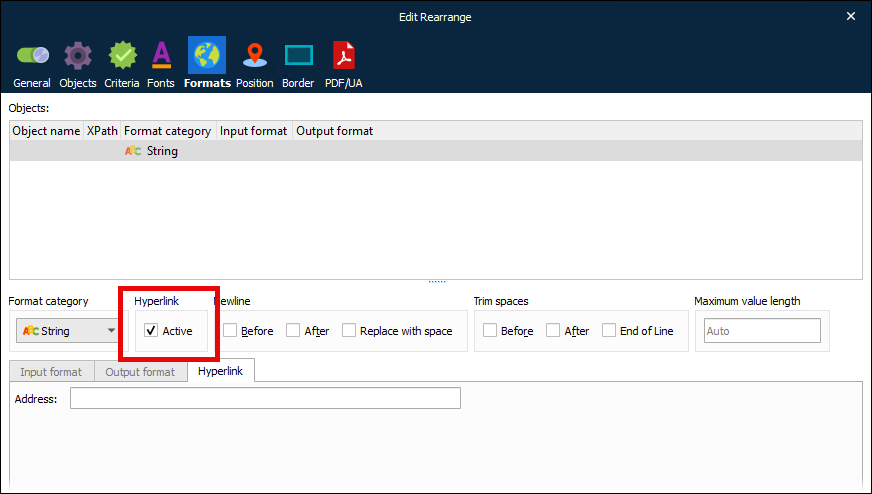
The next step depends on how you want to specify the link destination:
Use the input data as the destination: Leave Address blank. For example, suppose the form item is a rearrange that takes data from a
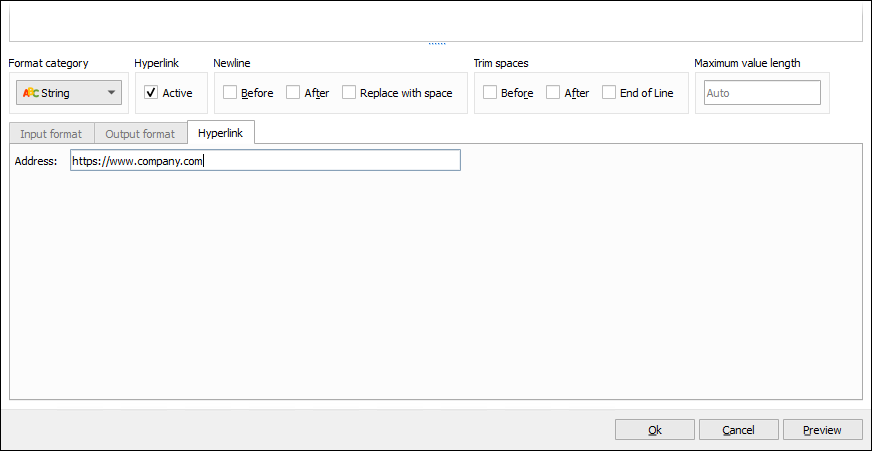
<website>element in the input XML data and adds it to the form design with italic formatting. If the input XML contains<website>https://www.company.com</website>, the rearrange’s visible label in the output document will be https://www.company.com and it will be a clickable link tohttps://www.company.com.Specify a URL: Enter the URL into the Address box. In the output document, the form item will be a clickable link to that URL.
Tip
You can insert an embedded JobInfo as a part of the hyperlink to include a dynamic value as a part of the URL.
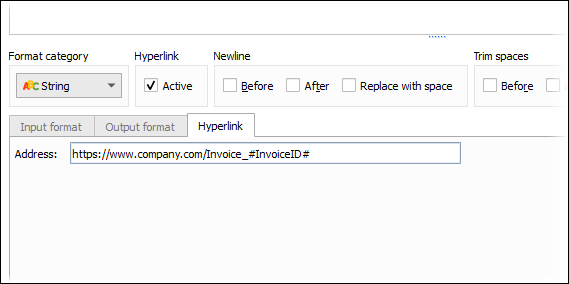
To insert the value of the current rearrange as a part of the hyperlink (through a JobInfo as shown above), change Object type to Script, then enter the following scripting code:
setJobInfo("InvoiceID", CurrentRearrange.text);CurrentRearrange.text;
Click Ok. The Form Editor modifies the rearrange.