
Security Hotfix R250326
- 06 May 2026
- 4 Minutes to read
- Contributors


- Print
- PDF
Security Hotfix R250326
- Updated on 06 May 2026
- 4 Minutes to read
- Contributors
- Print
- PDF
Article summary
Did you find this summary helpful?
Thank you for your feedback
To fix the security vulnerability R250326, the Lasernet Group recommends upgrading to Autoform DM 10.5.5. However, if an upgrade is not currently feasible, you can run the hotfix batch script on an existing Autoform DM installation and plan to upgrade at the earliest opportunity.
The hotfix removes the security vulnerability with minimal disruption or change to the application. It has no functional impact on your system, other than to resolve the vulnerability, and does not affect your ability to upgrade in the future.
Prerequisites
A standalone server or a cluster running Autoform DM 10.0.x or later.
The security hotfix downloaded to your test environment.
Installation
The installation instructions depend on whether Autoform DM is running in standalone or clustered mode.
Run the hotfix batch script on your test environment first. After successful deployment and testing, repeat the process on all other environments.
Standalone Installations
First, run the batch script in test mode to verify the vulnerability exists on your server. Then, if necessary, run the script in patch mode to fix it.
Run the Batch Script in Test Mode
In test mode, the batch script scans your installation without making any updates. You do not need to shut down the Autoform DM service.
Copy and extract the two files from
security-hotfix-r250326.zipinto thetoolsdirectory on your Autoform DM server. For standalone installations, the default path isC:\Program Files\Formpipe Software\Autoform DM\<Server_10.x>\tools. Substitute<Server_10.x>for the appropriate Autoform DM version.Open a command prompt and change into the
toolsdirectory. For example, from the root directory (C:\), use the following command, again substituting<Server_10.x>for the appropriate Autoform DM version:cd Program Files\Formpipe Software\Autoform DM\<Server_10.x> - DM\toolsRun the batch script in test mode:
security-hotfix-r250326.bat -tThe script detects your installation type (see 1 in the image below) and path (2).
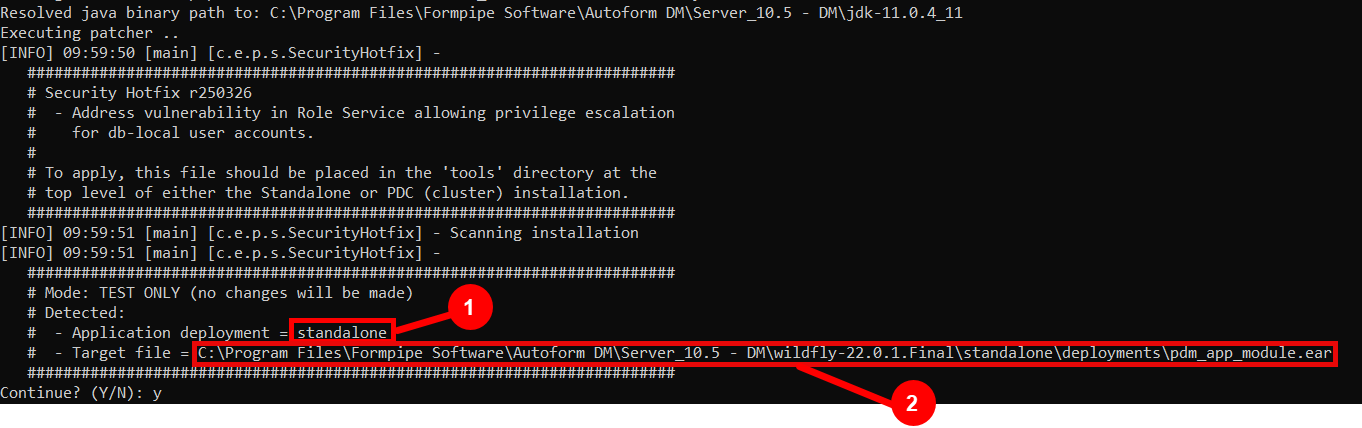
Enter
Yto continue running the script. If the script detects the security vulnerability,PATCH REQUIREDis displayed on the console, and you must continue to the next section to patch your system..PNG)
Press any key to exit the script.
Run the Batch Script in Patch Mode
Patch mode creates a backup of your existing installation and then applies the security hotfix. During this process, the Autoform DM application is redeployed. For this reason, Lasernet Group recommends performing this task outside of core business hours.
Shut down the Autoform DM service.
From a command prompt, change into the
toolsdirectory. For example, from the root directory (C:\), use the following command, substituting<Server_10.x>with the appropriate Autoform DM version:cd Program Files\Formpipe Software\Autoform DM\<Server_10.x> - DM\toolsRun the batch script in patch mode:
security-hotfix-r250326.batThe script detects your installation type (see 1 in the image below) and path (2).
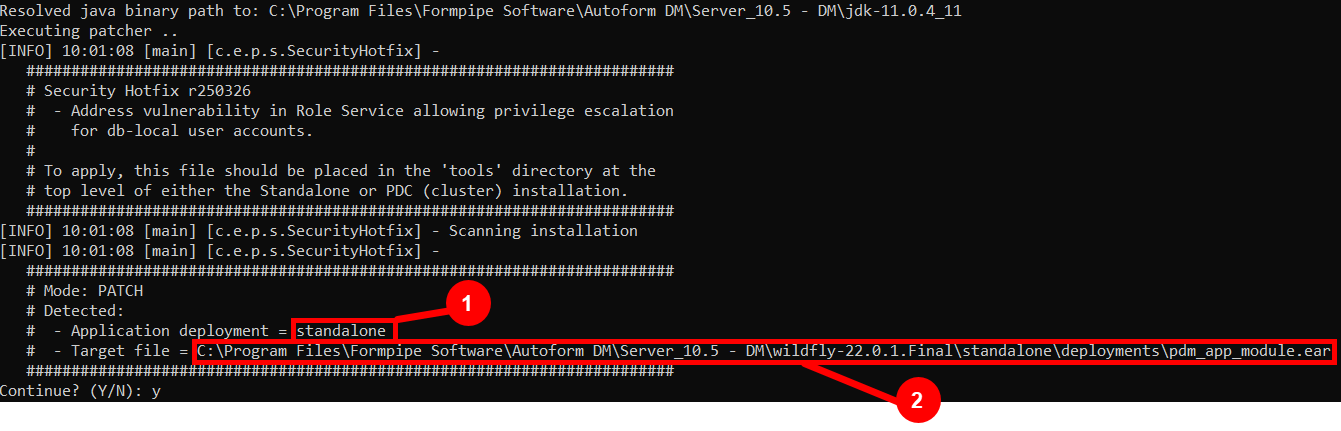
Enter
Yto continue running the script. The script copies a backup of the existing installation to thedeploymentsdirectoryC:\Program Files\Formpipe Software\Autoform DM\<Server_10.x> - DM\wildfly 22.0.1.Final\standalone\deployments\pdm_app_module.ear.bak(see “a” in the image below) and then applies the security updates..png)
When
PATCH COMPLETEis displayed on the console (b), press any key to exit the script.Tip
The script also creates a file called
security-hotfix-r250326.successin thetoolsdirectory, which enables you to track which servers have been updated. You can delete both this file and the backup when you have successfully tested your server.Restart the Autoform DM service, then complete all test procedures before deploying the hotfix to all other environments.
Clustered Installations
Install the security hotfix on the PDC only. Do not apply the hotfix directly to the cluster nodes.
First, run the batch script in test mode to verify the vulnerability exists on your server. Then, if necessary, run the script in patch mode to fix it.
Run the Batch Script in Test Mode
In test mode, the batch script scans your installation without making any updates. You do not need to shut down the Autoform DM service on your PDC.
Copy and extract the two files from
security-hotfix-r250326.zipinto thetoolsdirectory on your PDC. For clustered installations, the default path isC:\Program Files\Formpipe Software\Autoform DM\<Server_10.x> - <cluster_name> - <cluster_role>\tools. Substitute<Server_10.x>,<cluster_name>, and<cluster_role>for the correct details for your PDC.Open a command prompt and change into the
toolsdirectory. For example, from the root directory (C:\), use the following command, substituting<Server_10.x>,<cluster_name>, and<cluster_role>for the correct details for your PDC:cd Program Files\Formpipe Software\Autoform DM\<Server_10.x> - <cluster_name> - <cluster_role>\toolsRun the batch script in test mode:
security-hotfix-r250326.bat -tThe script detects your installation type (see 1 in the image below) and path (2).
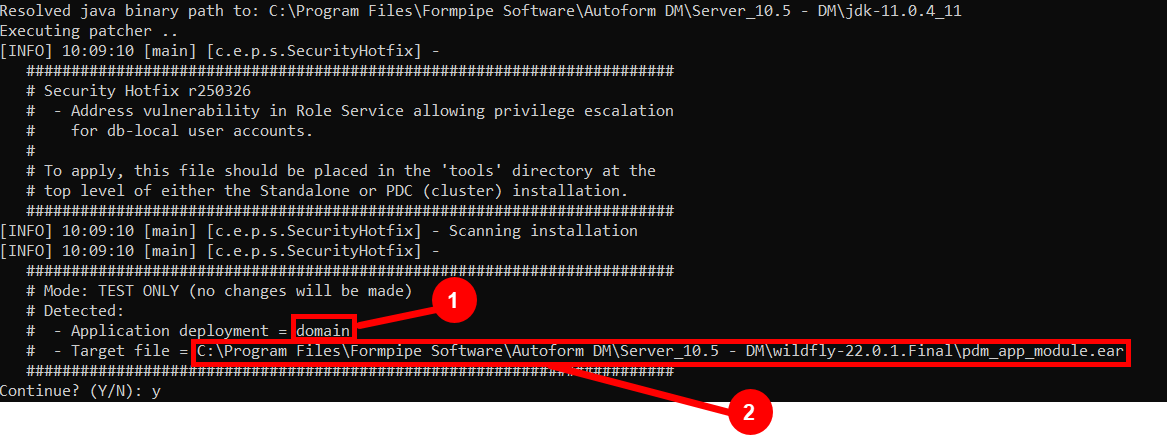
Enter
Yto continue running the script. If the script detects the security vulnerability,PATCH REQUIREDis displayed on the console, and you must continue to the next section to patch your system.
Press any key to exit the script.
Run the Batch Script in Patch Mode
Patch mode creates a backup of your existing installation and applies the security hotfix to the PDC. The PDC then pushes the updates to all cluster nodes. For this reason, you must not shut down the PDC or cluster nodes while the script is running.
From a command prompt, change into the
toolsdirectory. For example, from the root directory (C:\), use the following command, substituting<Server_10.x>,<cluster_name>, and<cluster_role>with the correct details for your PDC:cd Program Files\Formpipe Software\Autoform DM\<Server_10.x> - <cluster_name> - <cluster_role>\toolsRun the batch script in patch mode:
security-hotfix-r250326.batThe script detects your installation type (see 1 in the image below) and path (2).
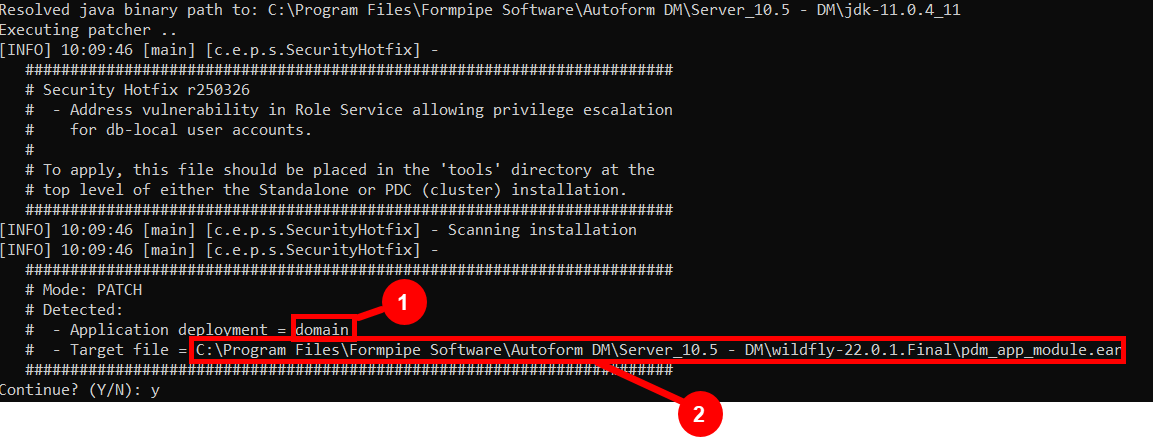
Enter
Yto continue running the script. The script starts (see “a” in the image below), copies a backup of your installation to thedeploymentsdirectoryC:\Program Files\Formpipe Software\Autoform DM\<Server_10.x> - <cluster_name> - <cluster_role>\wildfly-22.0.1.Final\domain\deployments\pdm_app_module.ear.bak(b), and then applies the security updates to both the PDC and cluster nodes..png)
If the redeployment pauses or fails, follow the troubleshooting guidance on the console. For example, if the PDC or cluster nodes are shut down, you will be prompted to restart the cluster before resuming the script (c).
When
PATCH COMPLETEis displayed on the console, press any key to exit.Tip
The script also creates a file called
security-hotfix-r250326.successin thetoolsdirectory. You can delete both this file and the backup when you have successfully tested your serverComplete all test procedures before deploying the hotfix to all other environments.