
Global Lasernet Core Script Classes
- 01 May 2026
- 12 Minutes to read
- Contributors


- Print
- PDF
Global Lasernet Core Script Classes
- Updated on 01 May 2026
- 12 Minutes to read
- Contributors
- Print
- PDF
Article summary
Did you find this summary helpful?
Thank you for your feedback
Applies to: Lasernet Core 11
Job
Description
The Job class is used throughout Lasernet Core to access the JobData being processed. An instantiation of the Job class (job) almost always exists. The only situation in which the job object is not available is when creating module JobInfos. It is not possible to instantiate a job from script.
Properties
type | |
Description | Always returns the value ‘Job’ |
Access | Read |
Returns | String |
Example | |
Methods
getJobData | |
Description | Provides access to the primary JobData of the job being processed |
Access | Read |
Returns | ByteArray |
Example | Saves JobData to a file: File.write("c:\\myfile.txt", job.getJobData()); |
hasJobInfo | |
Description | Check if Job has a specific JobInfo |
Access | Read |
Parameters | jobInfoName : String |
Returns | Boolean |
Example | Saves JobData to a file: if (job.hasJobInfo(‘FileName’) == false) { // job does not have the FileName jobinfo }; |
jobInfoIndexOf | |
Description | Returns index of a particular value within a JobInfo array |
Access | Read |
Parameters | jobInfoName : String Value: String [CaseSenstive: Boolean = true] |
Returns | Boolean |
Example | Returns the Content-Type HTTP header value from a request: job.getJobInfo('RequestHeaderValues', job.jobInfoIndexOf('RequestHeaderNames', 'Content-Type') ); |
addDestination | |
Description | Adds a destination to where the Job should be sent, when the current module has finished its processing. If the replace parameter is true all existing destinations for the job are cleared. If replace is false a destination is added. |
Parameters | destination :String [replace : Boolean = true] |
Returns | None |
Example | job.addDestination('Printer'); job.addDestination('File out, false); |
deleteJobInfo | |
Description | Removes all JobInfos with the given jobInfoName from the job entirely |
Parameters | jobInfoName :String |
Returns | none |
Example | job.deleteJobInfo('MyJobInfo’); |
getAllJobInfos | |
Description | Returns a stringlist for JobInfo names assigned to a job. |
Parameters | none |
Returns | StringList |
Example | var jobinfos = job.getAllJobInfos(); for (idx = 0; idx < jobinfos.length; idx++) { var key = jobinfos[idx]; var value = job.getJobInfo(key); Logger.logEvent(Debug, key + " = " + value); } |
getJobInfoCount | |
Description | Returns the number of items in the JobInfo array with the given jobInfoName. If the JobInfo does not exist the method returns 0 (zero). Please note that calling job.getJobInfoCount() is a relatively expensive operation, therefore it is better to catch the value in a local variable. |
Parameters | jobInfoName : String |
Returns | Number |
Example | var count = job.getJobInfoCount('Filenames'); var index; for (index = 0; index < count; index++) { var filename = new String(job.getJobInfo('Filenames', index)); // Do something fascinating with that file } |
getJobInfo | |
Description | Returns the value of the jobinfo with the given jobInfoName. If more than one jobinfo with that name exists a specific one can be chosen using the given index parameter. If no jobinfo with the given name exists an empty string is returned. |
Parameters | jobInfoName : String |
Returns | String |
Parameters | jobInfoName : String [arrayIndex : Number = 0] |
Returns | String |
Example | job.getJobInfo('MyJobInfo'); |
getJobInfoBinary | |
Description | Returns the value of the jobinfo with the given jobInfoName. If more than one jobinfo with that name exists a specific one can be chosen using the given index parameter. If no jobinfo with the given name exists an empty ByteArray is returned. |
Parameters | jobInfoName : String [arrayIndex : Number = 0] |
Returns | ByteArray |
Example | job.getJobInfoBinary('MyJobInfo'); |
getSize | |
Description | Returns the size of the JobData part of the Job. |
Parameters | None |
Returns | Number |
Example | var size = job.getSize(); var size2 = job.size; |
load | |
Description | A Job can be loaded via the load function on the job object. It might be useful to load a range of jobs and run a range of checks on them. Loading must be done with .lnjob files and can be either absolute or relative to the grab folder of the configuration. Function will return true if load was successful. |
Parameters | filename : string [modulename : string] |
Returns | Boolean |
Example | job.load('c:\\myfile1.lnjob'); job.load('myfile2.lnjob'); |
save | |
Description | A Job can be saved via the save function on the job object. It might be useful to save a range of jobs and run a range of checks on them. Save must be done with .lnjob files and can be either absolute or relative to the grab folder of the configuration. Function will return true if save was successful. |
Parameters | filename : String |
Returns | Boolean |
Example | job.save('c:\\myfile1.lnjob'); job.save('myfile2.lnjob'); |
setJobData | |
Description | Provides access to the primary JobData of the job being processed |
Parameters | ByteArray or String |
Returns | None |
Example | Loads the content of myfile.txt into JobData jobInfo: job.setJobData(File.read("c:\\myfile.txt")); |
setJobInfo | |
Description | Sets the value of the JobInfo with the given jobInfoName to value. If replace is true any existing JobInfo with the given name is deleted. Otherwise, a new value is appended. It is currently not possible to set a value for a specific index. |
Parameters | jobInfoName : String value : String [replace : Boolean = true] [loglevel : Integer = JobInfo, where valid integers are; JobInfo: 12 Debug: 1 NoLog: 8 ] |
Returns | none |
Example | job.setJobInfo('MyJobInfo', 'A nice value'); |
setJobInfoBinary | |
Description | Sets the value of the JobInfo with the given jobInfoName to value. If replace is true any existing JobInfo with the given name is deleted. Otherwise, a new value is appended. It is currently not possible to set a value for a specific index. The ByteArray value can be obtained from the readAll method of the Fileclass (for example). |
Parameters | jobInfoName : String value : ByteArray [replace : Boolean = true] [loglevel : Integer = JobInfo, where valid integers are; JobInfo: 12 Debug: 1 NoLog: 8 ] |
Returns | none |
Example | var f = new File('c:\\test.txt'); if (f.open(IO_ReadOnly)) { job.setJobInfoBinary('ContentsOfTheFile', f.readAll()); f.close(); } |
substituteJobInfos | |
Description | Returns a string built upon data from the Job and the specified expression. Expression can use hash marks to return data from Job in the tag format “#<jobinfoname>#”. |
Parameters | expression : String |
Returns | String |
Example | var filename = job.substituteJobInfos('file_#JobID#'); |
Logger
Description
The Logger class is used throughout Lasernet Core to make custom logger messages. An instantiation of the Logger class (logger) almost always exists. The only situation in which the logger object is not available is when creating module JobInfos. It is not possible to instantiate the Logger from script.
Methods
logEvent | |
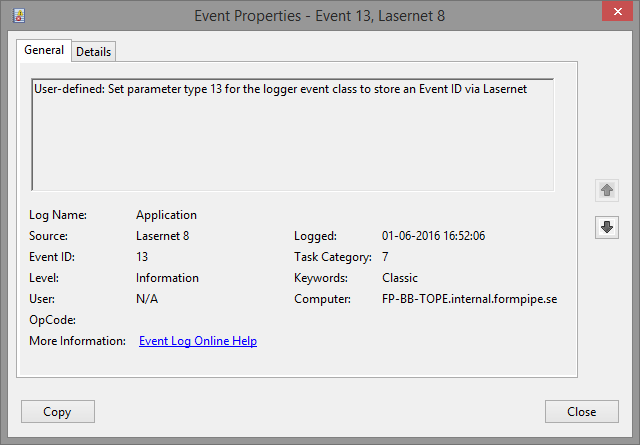
Description | Creates a logger message. The message parameter contains the actual message, which is shown in the Message field in the monitor. The type parameter determines what kind of message is logged according to the following list. EventIDs type 13 or “EventLog” are used to store messages in Windows Event Log and not in the monitor. Event log messages must be activated in the Lasernet Core server settings before Windows Event Logs can be stored. EventIDs type 14 or “SysLog” are used to store messages on Syslog server and not in the monitor. Syslog messages must be activated in the Lasernet Core server settings before Syslogs can be stored.
(Screen shot taken from Lasernet 8, but is similar in newer versions of Lasernet Core) |
Parameters | type : Number, where type can be one of the following; Windows Event Log: 13 JobInfo: 12 Debug: 1 NoLog: 8 Values below 100 are reserved for future use, but values from 100 and above may be used for any custom message you want. message :String |
Returns | None |
Example | logger.logEvent(Debug, 'The value is now: ' + job.getJobInfo('value')); logger.logEvent(999, 'My custom message'); Logger.logEvent(EventLog, 'Store message in Windows Event Log'); Logger.logEvent(13, 'Store message in Windows Event Log'); Logger.logEvent(SysLog, 'Store message on Syslog server'); Logger.logEvent(14, 'Store message on Syslog server'); |
Modifier
Description
The Modifier class is used throughout Lasernet Core to access the modifiers defined in Lasernet Developer. These modifiers are made available through an associative array modifiers which has one entry for each modifier defined. Use the name of the modifier to access it.
Properties
type | |
Description | Always returns the value Modifier. |
Access | Read |
Returns | String |
Example | |
Methods
run | |
Description | Executes the modifier using the given job. If the modifier has support for it, it can be run on the JobInfo with the given jobInfoName (parameter one), that after processing contains the new value. If no jobInfoName is given the standard JobData JobInfo is used. |
Parameters | job : Job [jobInfoName : String] [jobInfoName : String] |
Returns | none |
Example | modifiers['Base64 Encoder'].run(job, 'MyJobInfo', 'MyNewJobInfo'); modifiers['Base64 Encoder'].run(job, 'MyJobInfo'); modifiers['Base64 Decoder'].run(job); |
AzureStorageCommands
Description
The AzureStorageCommands class is used throughout Lasernet Core to access the Azure Storage commands defined in Lasernet Developer. These commands are made available through an associative array azurestoragecommands which has one entry for each command defined. Use the name of the azure storage command to access it.
Properties
type | |
Description | Always returns the value Modifier. |
Access | Read |
Returns | String |
Example | |
Methods
run | |
Description | Executes the azure storage command using the given job. The name is case-sensitive. |
Parameters | job : Job [jobInfoName : String] |
Returns | None |
Example | azurestoragecommands['DownloadBlob'].run(job); |
DatabaseCommands
Description
The DatabaseCommands class is used throughout Lasernet Core to access the database commands defined in Lasernet Developer. These commands are made available through an associative array databasecommands which has one entry for each command defined. Use the name of the database command to access it.
Properties
type | |
Description | Always returns the value Modifier. |
Access | Read |
Returns | String |
Example | |
Methods
run | |
Description | Executes the database command using the given job. The name is case-sensitive. |
Parameters | job : Job [jobInfoName : String] |
Returns | None |
Example | databasecommands['DatabaseLookup'].run(job); |
SharepointCommands
Description
The SharepointCommands class is used throughout Lasernet Core to access the Microsoft Sharepoint commands defined in Lasernet Developer. These commands are made available through an associative array sharepointcommands which has one entry for each command defined. Use the name of the SharePoint command to access it.
Properties
type | |
Description | Always returns the value Modifier. |
Access | Read |
Returns | String |
Example | |
Methods
run | |
Description | Executes the SharePoint command using the given job. The name is case-sensitive. |
Parameters | job : Job [jobInfoName : String] |
Returns | None |
Example | sharepointcommands['SharepointLookup'].run(job); |
XMLTransformers
Description
The XMLTransformers class is used throughout Lasernet Core to access the XML Transformers defined in Lasernet Developer. These commands are made available through an associative array xmltransformers which has one entry for each command defined. Use the name of the xml transformer to access it. This class accesses XML Transformers defined in the XML Transformer Engine only. XML Transformers defined as modifiers are accessed via the modifier class.
Properties
type | |
Description | Always returns the value Modifier. |
Access | Read |
Returns | String |
Example | |
Methods
run | |
Description | Executes the XML Transformer command using the given job. |
Parameters | job : Job [jobInfoName : String] |
Returns | None |
Example | xmltransformers['XMLActions'].run(job); |
SystemInfo
Description
The SystemInfo class is used throughout Lasernet Core to access various system information. It has only static properties and methods and is therefore never instantiated.
Static Properties
computerName | |
Description | Returns the name of the computer on which Lasernet Core is currently running. |
Access | Read |
Returns | String |
Example | var MyComputer = new String (SystemInfo.computerName); |
Static Methods
getTempPath | |
Description | Returns the temporary path directory used by windows. |
Parameters | None |
Returns | String |
Example | SystemInfo.getTempPath(); |
getTempFilename | |
Description | Returns a temporary unique filename in the directory given. This does not need to be the directory returned by SystemInfo.getTempPath. |
Parameters | path : String |
Returns | String |
Example | SystemInfo.getTempFilename('c:\\lasernet'); |
ByteArray
Description
The ByteArray class is used for searching a bytearray or manipulating a bytearray.
Properties
type | |
Description | Returns the value 'ByteArray'. |
Access | Read |
Returns | String |
bytearray | |
Description | Returns array of bytes. |
Access | Read/Write |
Returns | bytearray |
Methods
append | |
Description | Appends a string to the array. |
Parameters | value: String |
Returns | Nothing |
Example | var bytes = new ByteArray(); bytes.append("anything"); |
Output | |
count | |
Description | Returns number of bytes in array. |
Parameters | None |
Returns | Integer |
Example | Logger.logEvent(Debug, "Replaced " + bytes.count() + " bytes"); |
Output | |
indexOf | |
Description | Searches for position of another byte array within byte array. |
Parameters | bytearray: ba Integer: from |
Returns | Integer. First position of bytearray after from index position. |
Example | var bytes = new ByteArray(); bytes.bytearray = job.jobdata; var search = new ByteArray(); search.append(["a", "b", "c"]); var position = bytes.indexOf(search.bytearray); if (position > -1) ... |
Output | |
replace | |
Description | Replaces a range of bytes within byte array with another byte array. |
Parameters | Integer: Start index Integer: length bytearray: after |
Returns | Integer. First position of bytearray after from index position. |
Example | var replace = new ByteArray(); replace.append(["a", "b", "c"]); bytes.replace(position, replace.count(), replace.bytearray); job.jobdata = bytes.bytearray; |
Output | |
resize | |
Description | Resizes array to the specified size. |
Parameters | Integer: New size |
Returns | Nothing |
Example | bytes.resize(10); |
Output | |
GUID
Description
The GUID class represents a unique number.
Properties
uuid | |
Description | Universally Unique IDentifier. |
Access | Read/Write |
Returns | UUID |
Example | var guid1 = new Guid(); var guid2 = new Guid(); if (guid1.uuid == guid2.uuid) Logger.logEvent(Debug, "Same"); else Logger.logEvent(Debug, "Different"); guid2.uuid = guid1.uuid; // assign the uuid of guid1 to guid2 if (guid1.uuid == guid2.uuid) Logger.logEvent(Debug, "Same"); else Logger.logEvent(Debug, "Different"); |
Output | Different Same |
Methods
fromRfc4122 | |
Description | The RFC4122 representation of a GUID in a byte array. |
Parameters | GUID: Byte array |
Returns | |
Example | var guid = new Guid(); var data = guid.toRfc4122(); var shortguid = Base64.encode(data); shortguid = shortguid.replace("/", "_"); shortguid = shortguid.replace("+", "-"); shortguid = shortguid.mid(0, 22); Logger.logEvent(Debug, "ShortGuid = '" + shortguid + "' from guid = '" + guid + "'"); |
Output | ShortGuid = '_H6-tFHyQO65OvX/F8L+0w' from guid = '{fc7ebeb4-51f2-40ee-b93a-f5ff17c2fed3}' |
fromString | |
Description | |
Parameters | GUID : String |
Returns | String |
Example | var guid = new Guid(); guid.fromString('{fc7ebeb4-51f2-40ee-b93a-f5ff17c2fed3}'); Logger.logEvent(Debug, guid); |
Output | {fc7ebeb4-51f2-40ee-b93a-f5ff17c2fed3} |
toRfc4122 | |
Description | A byte array representation of a GUID in the RFC4122 format. |
Parameters | |
Returns | Byte array |
Example | var shortguid = '_H6-tFHyQO65OvX/F8L+0w'; shortguid = shortguid.replace("_", "/"); shortguid = shortguid.replace("-", "+"); var data = Base64.decode(shortguid + "=="); var guid = new Guid(); guid.fromRfc4122(data); Logger.logEvent(Debug, "Guid = '" + guid + "'"); |
Output | Guid = '{fc7ebeb4-51f2-40ee-b93a-f5ff17c2fed3}' |
toString | |
Description | Converts the GUID to a string representation. |
Parameters | |
Returns | String |
Example | var guid = new Guid(); Logger.logEvent(Debug, guid.toString()); |
Output | {1e4408bb-5211-4179-8d8f-7230702730fe} |
Hash
Description
The Hash class returns a hash value.
Methods
md5 | |
Description | Calculates the MD5 hash of a byte array. Warning: Use of MD5 is strongly discouraged and this method is provided only for backward compatibility. MD5 is subject to removal in future versions of Lasernet Core. |
Parameters | Value: Byte array |
Returns | String |
Example | var data = new ByteArray; data.append("Return this string as a md5 hash"); var md5 = Hash.md5(data.bytearray); |
Output | 1105DD801EECBE3F886C9BF87F851686 |
sha1 | |
Description | Calculates the SHA1 hash of a byte array. Warning: Use of SHA1 is strongly discouraged and this method is provided only for backward compatibility. SHA1 is subject to removal in future versions of Lasernet Core. |
Parameters | Value: Byte array |
Returns | String |
Example | var data = new ByteArray; data.append("Return this string as a sha1 hash"); var sha1 = Hash.sha1(data.bytearray); |
Output | E66B4CE83BB5302FD6825480EE6CD6D68C73647F |
sha256 | |
Description | Calculates the SHA-256 hash of a byte array. |
Parameters | Value: Byte array |
Returns | String |
Example | var data = new ByteArray; data.append("Return this string as a sha256 hash"); var sha1 = Hash.sha256(data.bytearray); |
Output | 0F6F60F35E362423CB36294C6C9BDF4CBEFCAC92AE6DB500970C5E393CFFB4B4 |
hmac | |
Description | Calculates the Hash-Based Message Authentication Code (HMAC) of a byte array. Note: Although MD5 and SHA1 are not as insecure when used to calculate an HMAC compared to when they are used in standalone hash functions, they are also not as secure as SHA256 and are therefore not implemented by this method. |
Parameters | Key: String Data: Byte array or String Algorithm: String (“SHA256”) |
Returns | String (Hex represention of the calculated hmac) |
Example | Hash.hmac("key", "The quick brown fox jumps over the lazy dog", "SHA256") |
Output | f7bc83f430538424b13298e6aa6fb143ef4d59a14946175997479dbc2d1a3cd8 |
crc32 | |
Description | Calculates the ISO 3309 CRC-32 of the given value. This is not a cryptographically safe value. Collisions are common. This capability can be used to detect file corruption. If the CRC-32 value calculated for the copy of a file is different from the CRC-32 value for the original file, the copy of the file is corrupt. |
Parameters | Value: Byte array |
Returns | Number |
Example | var data = new ByteArray; data.append("Return this string as a crc32 hash"); var crc32 = Hash.crc32(data.bytearray)); |
Output | 1434952195 |
murmur2 | |
Description | Calculates the Murmur2 hash of a byte array. |
Parameters | Value: Byte array |
Returns | String |
Example | var data = new ByteArray; data.append("Return this string as a murmur2 hash"); var sha256 = Hash.murmur2(data.bytearray); |
Output | 2800582856 |
toByteArray | |
Description | Converts a hex string into a Byte array. Each hex-digit-pair is converted into one byte in the Bytearray. |
Parameters | Hash: String |
Returns | Byte array |
Example | var ba = Hash.toByteArray("E66B4CE83BB5302FD6825480EE6CD6D68C73647F"); |
MagicBytes
Description
The MagicBytes class identifies the type or encoding of the data in a byte array or JobInfo.
Methods
detectEncoding | |
Description | Returns a String that identifies the encoding of the data in a byte array. The data can be read from a file or a JobInfo. If the encoding is recognized, this method returns one of the following values:
|
Parameters | data: Byte array |
Returns | String |
Example | var encoding = MagicBytes.detectEncoding(job.getJobData()); |
isDOC, isDOCX, isEDIFACT, isEMF, isFont, isImage, isJPEG, isJSON, isODT, isPDF, isPNG, isRTF, isTIFF, isXLS, isXLSX, isZIP | |
Description | Each method (isDOCX, isEMF, isImage, isFont, etc) returns a Boolean that identifies whether the data in a byte array is of that type. isFont supports the following formats:
|
Parameters | data: Byte array |
Returns | Boolean |
Example | var f = File('C:\\testfile'); if (f.open(IO_ReadOnly)) { if (MagicBytes.isDOCX(f.readAll())) Logger.logEvent(Debug, 'Is Word!'); if (MagicBytes.isImage(f.readAll()) Logger.logEvent(Debug, 'Is image!'); if (MagicBytes.isPDF(f.readAll()) Logger.logEvent(Debug, 'Is PDF!'); } |
isDOC, isDOCX, isEDIFACT, isEMF, isFont, isImage, isJPEG, isJSON, isODT, isPDF, isPNG, isRTF, isTIFF, isXLS, isXLSX, isZIP | |
Description | Each method (isDOCX, isEMF, isImage, isFont, etc) returns a Boolean that identifies whether the data held by a JobInfo in the specified job is of that type. JobInfoName specifies the JobInfo to analyze. If JobInfoName is not supplied, the JobData JobInfo is analyzed. isFont supports the following formats:
|
Parameters | job: Job [JobInfoName: string] |
Returns | Boolean |
Example | if ((getJobInfo('Extension').lower() == ".docx") && (MagicBytes.isDOC(job))) Logger.logEvent(Debug, 'Is Word!'); if (MagicBytes.isPDF(job, 'MyJobInfo'))) Logger.logEvent(Debug, 'Is PDF!'); |
Configuration
Description
The Configuration class returns information about the configuration.
Properties
configFilePath | |
Description | Returns the path to the resource folder. |
Parameters | |
Returns | String |
Example | Logger.logEvent(Debug, configuration.configFilePath); |
revision | |
Description | Returns the revision number of the Configuration. This only works when script is run server side - not in the Developer. In case of Server running with patch(es), it will show ‘Patched’ instead of a number. |
Parameters | |
Returns | String |
Example | |
Methods
getConnections | |
Description | List of Connections of any type. |
Parameters | |
Returns | An array of Connections (4.6.5). |
Example | var connections = configuration.getConnections(); for (idx = 0, count = connections.length; idx < count; idx++) { var connection = connections[idx]; Logger.logEvent(Debug, 'Connection=' + c.name + ' (Guid=' + c.guid + ', Description='+ c.description + ', type='+ c.type +')'); } |
Output | A list of Connections with names, descriptions and types |
getImages | |
Description | List of images in the resource folder. |
Parameters | [includePath: boolean = true] |
Returns | StringList |
Example | var images = configuration.getImages(false); for (idx = 0, count = images.length; idx < count; idx++) { var i = images[idx]; Logger.logEvent(Debug, 'Image=' + i); } |
Output | A list of images without path |
getModules | |
Description | List of Modules of any type. |
Parameters | |
Returns | An array of Modules (4.6.6). |
Example | var modules = configuration.getModules(); for (idx = 0, count = modules.length; idx < count; idx++) { var m = modules[idx]; Logger.logEvent(Debug, 'Module=' + m.name + ' (Guid=' + m.guid + ', Type='+ m.type +')'); if (m.type == 'Printer Service') Logger.logEvent(Debug, '(Printer=' + m.printer + ', PrintServer=' + m.printserver +')'); } |
Output | Module=Printer Output (Guid=bba7f010-7d64-478b-ba2e-bd24934b8c0e, Type=Printer Output) Module=Printer Service 1 (Guid=338d106e-b957-4cd7-8005-e7511576db8c, Type=Printer Service) (Printer=HP Color LaserJet CP522X PCL6 Class Driver, PrintServer=Ballerup) |
getOverlays | |
Description | List of Overlays available. |
Parameters | |
Returns | StringList |
Example | var overlays = configuration.getOverlays(); for (idx = 0, count = overlays.length; idx < count; idx++) { var o = overlays[idx]; Logger.logEvent(Debug, 'Overlay=' + o + ' (base64=' + Base64.encode(configuration.getOverlayThumbnail(o, 160, 100)).substring(0, 666) + ')'); } |
Output | Overlay=ElectricityFirstMiddle.pub.lnemf (base64=iVBO...) |
getOverlayThumbnail | |
Description | Returns a PNG thumbnail of a given Overlay with the specified dimension. |
Parameters | overlay: String width: Integer height: Integer |
Returns | Byte array |
Example | See getOverlays for example. |
getPrinterProfiles | |
Description | List of Printer Profiles in Configuration. |
Parameters | |
Returns | An array of Printers and their Printer Profiles (4.6.7). |
Example | var printerprofiles = configuration.getPrinterProfiles(); for (idx = 0, count = printerprofiles.length; idx < count; idx++) { var printer = printerprofiles[idx]; Logger.logEvent(Debug, 'Printer=' + printer.name + ', PrinterName=' + printer.printername); for (idy = 0, county = printer.profiles.length; idy < county; idy++) { var p = printer.profiles[idy]; Logger.logEvent(Debug, 'PrinterProfile=' + p.name); } } |
Output | Printer=Printer Output, PrinterName=HP PrinterProfile=Portrait PrinterProfile=Landscape |
getServers | |
Description | List of Servers in Configuration. |
Parameters | |
Returns | An array of Servers (4.6.9). |
Example | var servers = configuration.getServers(); for (idx = 0, count = servers.length; idx < count; idx++) { var s = servers[idx]; Logger.logEvent(Debug, 'Server=' + s.name + ' (Hostname=' + s.hostname + ', Port='+ s.port +')'); } |
Output | Server=Master (Hostname=Master, Port=3279) Server=Default (Hostname=localhost, Port=3279) |