
File Output
- 14 Apr 2026
- 1 Minute to read
- Contributors

- Print
- PDF
File Output
- Updated on 14 Apr 2026
- 1 Minute to read
- Contributors
- Print
- PDF
Article summary
Did you find this summary helpful?
Thank you for your feedback
Applies to: Lasernet Core 11
Used for sending jobs to a directory.
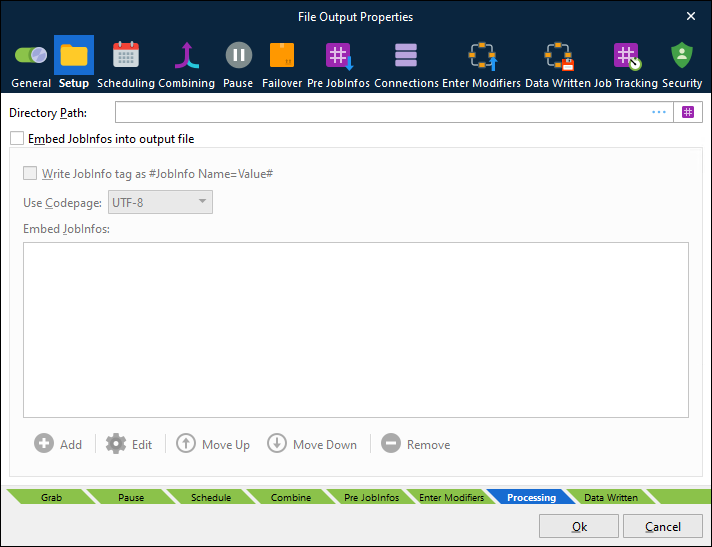
Directory Path | Sets the directory or UNC path where to store files. By default, the maximum length for a path is 260 characters. The filename should not be included. A local path is structured as follows: An extended length path is supported for a maximum total path length of 32,767 characters. To specify an extended length path you can use a prefix: To support an extended length path for a shared network drive type: The directory path can also be stored in a JobInfo. A JobInfo substitution is defined as the value of the directory path, for example: |
When printing to a File Output module the Filename JobInfo attribute sets the filename of the file produced.
Embed JobInfos into Output File
It is possible to make the File Output module insert specific JobInfos into the file. This is useful if the file is to be picked up by Lasernet Core again (the File Input module can collect the embedded JobInfos automatically) or if other programs have support for extracting the data. To enable insertion of JobInfos, select the Embed JobInfos into output file checkbox. The JobInfos will then be placed at the beginning of the file before the contents of JobData.
The JobInfo keywords can be embedded as #JobInfo Name=Value#. To use this feature, select Write JobInfo tag as #JobInfo Name=Value#.