
Windows Print Spooler and Printer Drivers
- 15 Apr 2026
- 4 Minutes to read
- Contributors

- Print
- PDF
Windows Print Spooler and Printer Drivers
- Updated on 15 Apr 2026
- 4 Minutes to read
- Contributors
- Print
- PDF
Article summary
Did you find this summary helpful?
Thank you for your feedback
Applies to: Lasernet Core 11
Introduction to the Print Spooler
The print spooler is the Windows component that enables print jobs to be routed to local and network printers. The spooler runs as the Windows service called Print Spooler and performs the following tasks:
Administers print job queues.
Converts print files to printer compatible formats.
Generates prints in a format understood by the printer.
Sends the prints to the printer module.
Reads status messages (such as “out of paper”) from the printer module.
These tasks are handled by print providers, print processors, printer drivers, port monitors and language monitors, respectively.
Print Formats
A print file format describes the layout and contents of the pages to be printed. The file format is also known as the data type or the data format of the print job. You can see the print job format by pausing the printer, then selecting properties on the job and looking at the data type field.
The most important print formats are:
Enhanced Windows Metafile (EMF)
The native Windows spooler print format is the Enhanced Windows Metafile format. This is the default print format used by Windows applications and is also the format that printer drivers use as their input. All other formats have to be converted to EMF before they can be sent to a printer driver – a print processor usually does this.
Plain text (TEXT)
Plain text formats are simply text files with no formatting.
Printer Control Language (PCL)
PCL is the native format used by most Hewlett-Packard (HP) printers. Many other printer vendors also support this format and it is commonly used by non-Windows applications.
PostScript (PS or PSCRIPT)
PostScript is a page description language used primarily in the electronic and desktop publishing areas and on UNIX systems. Neither the Windows print spooler nor Lasernet Core have direct support for this format.
Portable Document Format (PDF)
Portable Document Format is a file format developed by Adobe Systems for representing documents in a manner that is independent of the original application software, hardware, and operating system used for creation of those documents. PDF is an extension of the PostScript format.
RAW
The RAW format is not actually a specific format, but means that the print is already in a format understood natively by the printer and should be sent to it as is.
Print Processors
The print processor is the part of the print spooler that is responsible for converting any given input into a format that is understood by the printer. Every printer in Windows has a default print processor and print format associated with it. To view these settings, select properties on the printer and click the Print Processor button on the Advanced tab.
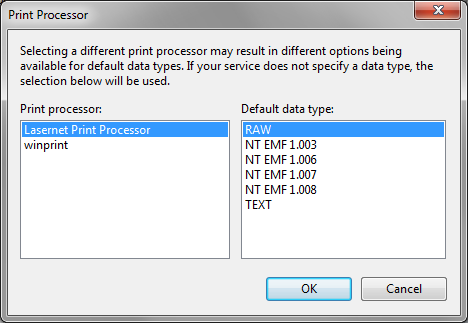
Each print processor shows a list of formats that it recognizes and is able to convert into a printer-compatible format. WinPrint, the default print processor, supports RAW, NT EMF and TEXT. If the printing application does not specify what format a print is provided in, the print spooler will default to the format and print processor selected on the printer. Unless changed on the printer, the default format is RAW. This means that if we copy a file to the printer, for example: copy /b c:\printfile \\mycomputer\myprintershare, the system will assume it is in RAW format.
The WinPrint print processor uses a printer driver for all its converting, except for RAW format. If data is received in RAW, the print processor passes it through unchanged. Otherwise, the print processor has to convert the remaining formats into EMF before they can be passed along to the printer driver. For formats like TEXT, WinPrint selects a Courier New font and assumes 80-character columns and 72 rows. Although many printers understand raw text files, the print processor will still convert it into EMF and pass it through the printer driver, to produce a print file in the printer’s native format, such as PCL for HP printers.
The Lasernet Print Processor is different. It will never perform any format conversion, always passing the input print format as it is to the printer module. If an application or printing service, such as printing from a Unix system, informs the Windows print spooler that the print is in TEXT, the usual WinPrint print processor will deliver the printers native format to Lasernet Core. This can sometimes be fixed by changing the data type on the UNIX system. However, changing the print processor to the Lasernet Print Processor is an alternative way to solve the problem, as the Form Engine needs to work with text.
Printer Drivers
A printer driver is the part of the print spooler that converts EMF data into the native format of the printer. The choice of printer driver affects the output received by Lasernet Core whenever a Windows application prints, or when a print processor can convert the print into EMF and pass it to a printer driver.
Lasernet Core is bundled with the following printer drivers.
Lasernet Text Only
This driver generates flat-format text files for Lasernet Core. It is the most commonly used driver for input printers and normally produces the best print for the Form Engine. Using the device settings on the printer, you can control how many rows and columns the driver maps the print into.
Lasernet EMF
The Lasernet EMF driver generates prints in the native Lasernet Core print format, LnEMF. The print produced includes everything printed by the application, including images and vector graphics. This is the ideal driver for generating overlays and when using the overlay engine. It is often used in combination with the Lasernet Print Processor to capture print as pure EMF and use LnEMF as a fallback.