
Performance Data for Lasernet Keep
- 27 May 2026
- 2 Minutes to read
- Contributors

- Print
- PDF
Performance Data for Lasernet Keep
- Updated on 27 May 2026
- 2 Minutes to read
- Contributors
- Print
- PDF
Article summary
Did you find this summary helpful?
Thank you for your feedback
This article provides performance data for Lasernet Keep 11.0 and shows its processing speed during specific tasks.
Note
Actual performance of your Keep system may differ from the performance tests due to factors such as hardware specification and software configuration. Performance data is provided for illustrative purposes only.
Test Environment
Performance tests used the following:
Hardware
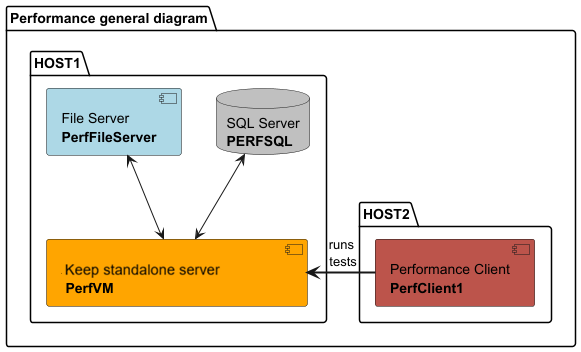
Testing was performed on dedicated hardware and used two hosts with the following configuration:
1 x Intel i7 8700K 3.7GHz (4.7GHz Turbo) 6 Cores (12 Threads)
64 GB RAM
SSD drives
1 GB network adapter
Test Configuration
The two hosts ran virtual machines under the following configuration:
Host 1
Name | CPUs | Memory | Operating system | Notes |
|---|---|---|---|---|
SQL Server VM | 6 | 8 | Windows Server 2019 | MS SQL Server 2019 Standard Edition |
File Server VM | 2 | 6 | Windows Server 2019 | |
Keep standalone server | 2 | 6 | Windows Server 2019 |
Host 2
Name | CPUs | Memory | Operating system | Notes |
|---|---|---|---|---|
Client VM | 6 | 8 | Windows Server 2019 |
System Size
Tests measured the performance of the following Keep system sizes. Although the number of documents is the main factor that influences performance, the number of document definitions and key definitions are also major factors.
Small: 5 document definitions, 20 key definitions, 3 line items, 10 million documents
Medium: 10 document definitions, 30 key definitions, 3 line items, 50 million documents
Large: 20 document definitions, 50 key definitions, 3 line items, 200 million documents
Input Data Size
The performance tests used the following input data sizes:
0 KB: Metadata only (no attachment)
100 KB: Metadata and PDF document attachment
200 KB: Metadata and PDF document attachment
1 MB: Metadata and PDF document attachment
2 MB: Metadata and PDF document attachment
Test Standards and Measurements
The tests used Keep REST API endpoints. Each combination shown in the following data tables is considered to be a distinct test. For example:
Small system standalone — 100 KB input data.
Medium system standalone — 1 MB input data.
We ran each test three times under the stated hardware configuration, using the same number of threads, and then calculated the average of the test’s results. The tests used 10 simultaneous threads to simulate realistic usage.
We endeavored to eliminate temporary environmental problems. For example, we paused Windows updates during testing to prevent background processes from affecting CPU load.
We measured throughput and processing time:
Throughput was measured in actions per second (a/s).
Processing time was measured in seconds.
Test Results
The following sections contain system performance results for the specified scenarios, using 10 simultaneous threads to create, get, or search documents:
“Create” and “get” tests used five input data sizes:
0 KB
100 KB
200 KB
1 MB
2 MB
“Search” tests used three data sizes (result per page/total results):
1/1
0/100
25/1000
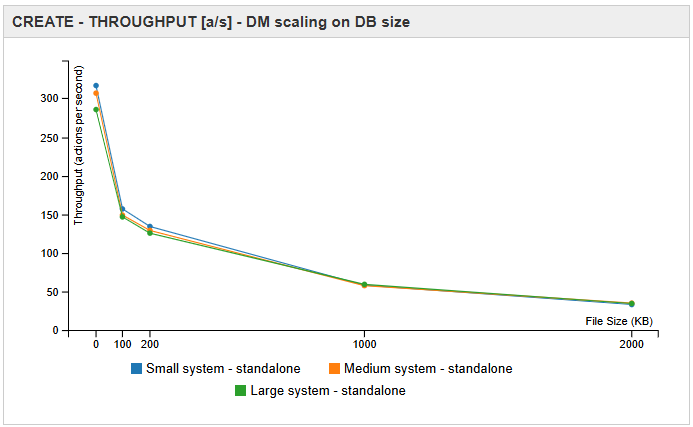
Create Documents Throughput (Actions Per Second)
System size and application node | 0 KB | 100 KB | 200 KB | 1 MB | 2 MB |
|---|---|---|---|---|---|
Small system - standalone | 316.53 | 157.08 | 134.47 | 58.54 | 33.59 |
Medium system - standalone | 306.70 | 149.17 | 129.40 | 58.07 | 35.42 |
Large system - standalone | 285.52 | 146.78 | 125.85 | 59.69 | 34.95 |
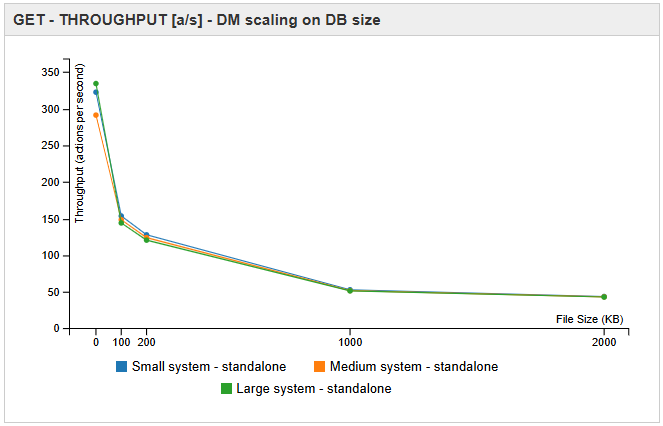
Get Documents Throughput (Actions Per Second)
System size and application node | 0 KB | 100 KB | 200 KB | 1 MB | 2 MB |
|---|---|---|---|---|---|
Small system - standalone | 322.58 | 153.62 | 127.91 | 52.98 | 43.76 |
Medium system - standalone | 291.30 | 148.49 | 124.10 | 51.72 | 43.28 |
Large system - standalone | 334.38 | 144.11 | 120.66 | 51.43 | 43.00 |
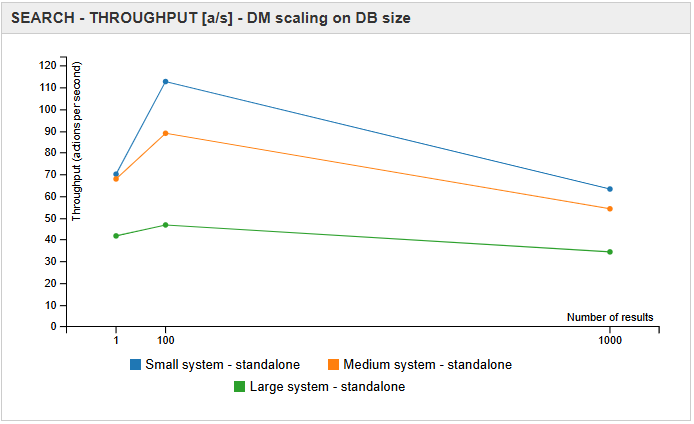
Search Documents Throughput (Actions Per Second)
System size and application node | 1/1 | 10/100 | 25/1000 |
|---|---|---|---|
Small system - standalone | 70.094 | 112.721 | 63.277 |
Medium system - standalone | 67.911 | 88.919 | 54.185 |
Large system - standalone | 41.710 | 46.743 | 34.352 |