
Lasernet FO Connector 7.2.2 Release Notes
- 27 Mar 2026
- 3 Minutes to read
- Contributors


- Print
- PDF
Lasernet FO Connector 7.2.2 Release Notes
- Updated on 27 Mar 2026
- 3 Minutes to read
- Contributors
- Print
- PDF
Article summary
Did you find this summary helpful?
Thank you for your feedback
Lasernet for Dynamics 365 Finance and Operations
Release version: 7.2.2
Release date: 22nd December 2025
Notes
The following documentation and files are available:
Warning
The Lasernet Connectors for Microsoft Dynamics 365 are currently not compatible with Lasernet Core 11.0. We are working towards launching these two products together, but until then, current customers and partners with the Dynamics 365 connectors should continue to use Lasernet Core 10.
Maintenance Report
This section briefly describes the new features, fixes, and enhancements in Lasernet FO Connector 7.2.2.
Version Numbers
Dynamics Finance and Operations 10.0.44 PU68 Version: 7.2.2.2512193
Dynamics Finance and Operations 10.0.45 PU69 Version: 7.2.2.2512194
Dynamics Finance and Operations 10.0.46 PU70 Version: 7.2.2.2512195
Dynamics Finance and Operations 10.0.47 PU71 Version: 7.2.2.2602242
New Features, Fixes, and Enhancements
Case No. | Area | Description | Ticket No. | Status |
|---|---|---|---|---|
493138@LAC365FO | Workspace | The image reference for the Lasernet workspace icon on the default dashboard has been updated. | Enhancement | |
492745@LAC365FO | Giro | In Lasernet FO Connector 7.1.3, when printing a Sales Invoice, the Giro report is not merged despite the Associated Payment Attachment parameter being set. | #47098 #46400 | Bug fix |
492743@LAC365FO | ER/EDI | An option to disable the automatic addition of RAW values within XML files has been introduced. | #47109 | Enhancement |
492227@LAC365FO | SSRS | Reusing data from the InMemory temporary table type for an SSRS report does not consistently provide the needed values. | #46994 | Bug fix |
492710@LAC365FO | Loading the SalesInvoice.Report on newer versions, along with a subreport, causes an error when reloading the report element. | Bug fix | ||
491227@LAC365FO | Query | An issue arises when a query is used as a condition within Predefined Destinations if the used table includes any extensions. | Bug fix | |
491013@LAC365FO | Standard Dynamics 365 | When the SalesInvoice report is printed without a replacement query, a warning is displayed about the PrepaymentInvoiceDetails.Design subreport. | #46813 | Bug fix |
490786@LAC365FO | Warehouse labels | An error occurs when trying to import the AOT query LACWHSPrintLabels into Lasernet FO Connector 7.2.x. | #46834 | Bug fix |
490398@LAC365FO | Report Parameter | Two new options have been added to the Parameter value within SSRS and replacement reports: LABEL and NAME. | #46788 | Enhancement |
491858@LAC365FO 489970@LAC365FO | Expressions | It is not possible to select the TableId in an expression or within the Query Wizard. | #47011 #46782 | Bug fix |
487780@LAC365FO | Query | The XML output is missing when adding a relation to a subquery table from another branch. | #46434 | Bug fix |
456315@LAC365FO | HTML Email Editor | A new Email Editor has been introduced. | New feature |
Models
Lasernet FO Connector 7.2.2 contains the following models, including the model for integration with D365CE (Dataverse) and the models for the Lasernet Print buttons.
Model | Description | Location/Remark |
|---|---|---|
Lasernet | Core and main engine for Lasernet FO Connector | Lasernet Requires activation key Lasernet > Setup > Parameters > License terms |
Lasernet81Spec | Additional requirements concerning 8.1 and newer versions of the standard Lasernet FO Connector | |
PRNButtons | Lasernet Print Buttons | Print buttons |
PRNButtonsLACAdaptor | Adaptor between the Lasernet Print Buttons and Lasernet | |
LACCE | Provides the integration to CE from Lasernet FO Connector | Lasernet > Dataverse/Dynamics 365 |
LACMSHotfixes | Hotfixes for standard Lasernet FO Connector | System administration > Setup > Hotfixes from Lasernet |
Lasernet Test Suite | Test and Performance Suite | Lasernet > Test and performance suite Requires activation key Lasernet > Test and performance suite > Parameters (see Important note below this table) |
LasernetPU35Spec | Support of Wave Labels in Lasernet FO Connector | |
Lasernet Autoform DM | Integration to Autoform DM (Archive) | |
Lasernet Engine | Embedded integration with Lasernet | Includes the Lasernet Engine and installer for the Lasernet Form Editor |
DynAzure Data Explorer | Lasernet Data Explorer | Lasernet > Test and performance suite > General tools > Data explorer Requires activation key Lasernet > Test and performance suite > Parameters |
DynAzure Electronic Reporting Connector | Lasernet E-Documents | Lasernet > Setup > Electronic reporting connector Requires activation key Lasernet > Setup > Electronic reporting connector > Electronic reporting connector Parameters |
DynAzure Tracking | Lasernet Tracking | Lasernet > Setup > Tracking Requires activation key Lasernet > Setup > Tracking > Tracking Parameters |
DynAzure OAuth tools | The model DynAzure OAuth provides OAuth |
Note
We highly recommend that you install all models from the deployable package.
Important
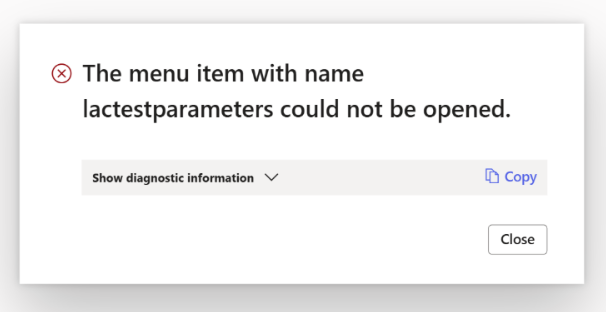
If the Data Explorer model is not installed, you will see the following error when you open the Test and Performance Suite Parameters form.
Error
The menu item with name lactestparameters could not be opened.
Add the AOT package
Either through LCS - Apply a deployable package to an environment
Or by installing a deployable package – Requires RDP access to the environment
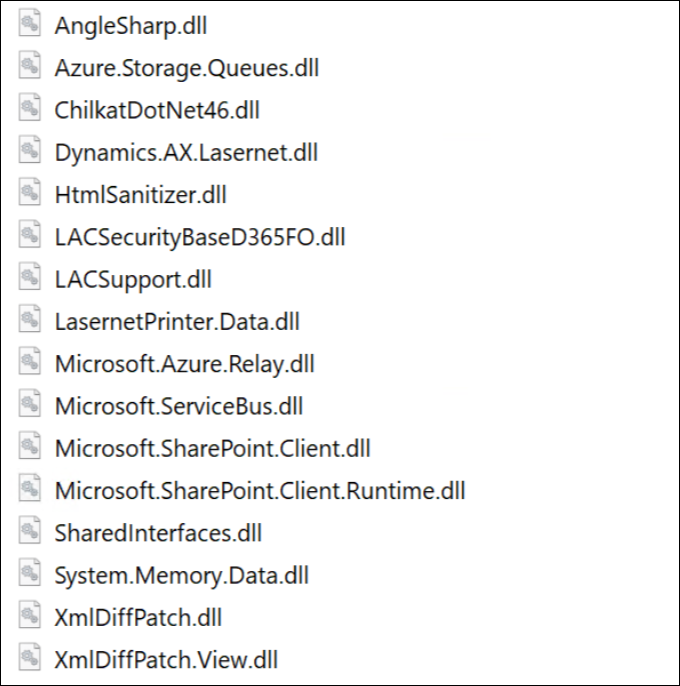
Ensure the following DLL files (new in Lasernet FO Connector 7.2) have been added to TFS if you are not just installing/deploying the AOT package:
Azure.Storage.Queues.dll
ChilkatDotNet46.dll
System.Memory.Data.dll
The following is the complete list of DLLs from the Lasernet model that are not automatically added:
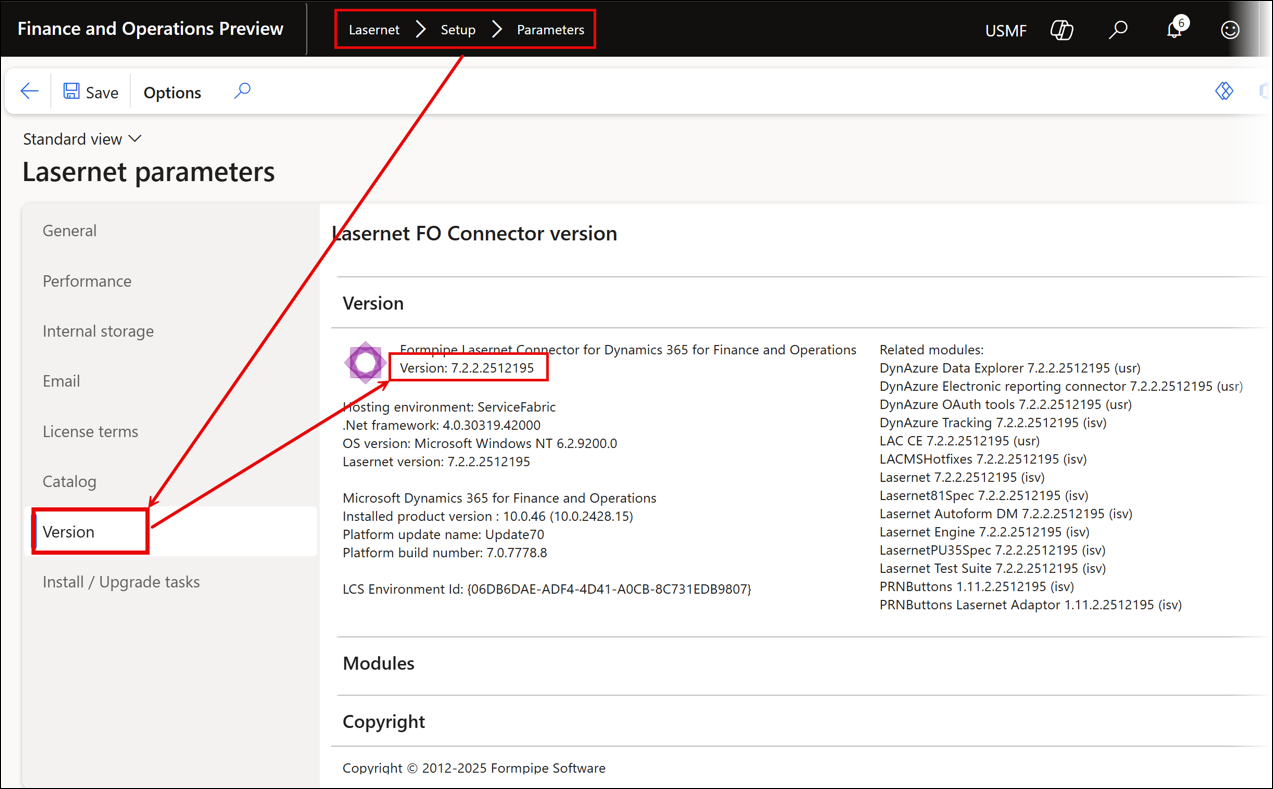
The version number should contain the number 7.2.2 after either installing or deploying the AOT package.
Lasernet > Setup > Parameters
If any files are missing, refer to Microsoft documentation.
Note
Different versions of Lasernet FO Connector are supported with different versions of Lasernet. A setup for each newer version of Lasernet is required for any new installation and when upgrading from an older version of Lasernet.
Prerequisite/Technical
Export the Lasernet FO Connector configuration, including all reports, to ensure data can be restored if needed.
It is possible to perform an in-place upgrade from a previous version as long as the previous version is relatively recent, such as Lasernet FO Connector 6.18.x.
How to Get Support
If you encounter difficulty using Lasernet FO Connector, contact Lasernet Support.