
Lasernet Core 11.0 Beta 3 Release Notes
- 02 Feb 2026
- 4 Minutes to read
- Contributors


- Print
- PDF
Lasernet Core 11.0 Beta 3 Release Notes
- Updated on 02 Feb 2026
- 4 Minutes to read
- Contributors
- Print
- PDF
Article summary
Did you find this summary helpful?
Thank you for your feedback
Release version: 11.0 Beta 3
Release date: 2nd February 2026
Notes
The following documentation and files are available.
Guides
Installation and migration
Administration
Application and service guides
Configuration Management and Deployment
Scripting
Microsoft integration
Note
This is a Beta release. The content of these release notes is subject to change until the final release of this software.
This Beta release should not be used in production environments.
As this is a Beta release, minor issues might exist in the software. Although Beta releases are not officially supported, you can submit issue reports via the Create Ticket button in the support portal.
Maintenance Report
This section briefly describes the new features and fixes in Lasernet Core 11.0 Beta 3.
New Features
The release introduces the following new features:
Extended and improved PDF/UA support.
Lasernet Manage.
Offline license activation.
Basic authentication for Web Server input modules.
Kubernetes scaling to multiple pods supports more input modules.
Change to default sheet destinations.
Specify size and position of the PDF Security modifier overlay.
Split PDFs before or after barcodes.
Specify which PDF pages are stamped.
Maximum age for log files.
For more information, see the accompanying detailed information about the new features and enhancements in this release.
Enhancements
Internal Ref. | External Ref. | Area | Details |
|---|---|---|---|
486566 487251 486565 | Form Engine | Lasernet’s PDF/UA support has been extended and improved. | |
492542 | Form Editor | The No indenting of tags option for XML sheets has been replaced by a choice between Compact and Pretty-Print styles. | |
492429 | Form Editor | Multiple changes for JSON sheets:
| |
485690 | Form Editor | The Default destination is not automatically added to new sheets. | |
490615 | Form Editor | Added the ability to edit printer profiles directly from the Sheet Options window. | |
465070 | Form Editor | Added support for
| |
490350 | XML Transformer Editor | Added Save Job functionality for the “pre” and “post” sides that creates an LNJOB file. | |
490818 | Azure Storage | Added support for Azure Storage in China and US Government Microsoft clouds. | |
468727 | Kubernetes | Scaling to multiple pods extended to include the following input modules:
| |
493402 | Lasernet Service Manager | Added support for specifying allowed CORS origins. | |
492286 | Lasernet Developer | Added warning text to the Commit Changes window to warn that the Administrator user should not commit changes. | |
488169 | PDF Security modifier | When you configure the PDF Security modifier, you can specify where on the page it overlays information about the digital signature used. | |
490442 | PDF Stamp modifier | Added options to stamp only the first or last page of the document. | |
490748 | PDF Stamp modifier | Added support for using TTF fonts from the configuration’s Resources area. | |
490303 | PDF Splitter engine | Added an option to split Before or After detected barcodes. | |
490690 | PDF to Text modifier | Added an option to extract form fields. | |
465938 | Lasernet Config web app | Added a confirmation step to the password reset process. | |
491344 | Logging | Added a Max log age setting for Lasernet environments. |
Fixes
Internal Ref. | External Ref. | Area | Details | Status |
|---|---|---|---|---|
460123 | Form Editor | Extra | Fixed | |
459088 | 43259 46826 | Lasernet Core | JSON output contains character entities such as | Fixed |
483525 | Job Engine | Criteria on module destinations are not evaluated if the job is paused, scheduled, or combined. | Fixed | |
479135 | Barcodes | If a JobInfo that is being used to provide values for a Swiss QR code property has not been set, Lasernet uses the name of the JobInfo as the property value. | Fixed | |
493371 | SharePoint Connection | When retrieving a list of subsites, Lasernet displays a maximum of 200 subsites. | Fixed | |
488709 | SQL Editor | Lasernet crashes when selecting some connection types in the SQL Editor | Fixed | |
466730 | PDF Security modifier | The overlay that the PDF Security modifier adds to a document does not contain “signed by” information. | Fixed | |
488480 | HTTP Output | The file picker for the Certificate property does not open if … (elipsis) is clicked for a second time. | Fixed | |
479465 | Monitor (Web) | The Type column contains no text for custom log messages. | Fixed |
Known Issue
Lasernet 11.0 Beta 3 has the following known issue.
Lasernet Manage Can Be Accessed Only from the Lasernet Config Server
To access Lasernet Manage from a web browser running on the Lasernet Config server, the user can go to https://localhost/lasernet/manage.
To access Lasernet Manage from another computer, the user should be able to go to https://<hostname>/lasernet/manage (appropriately substitute the <hostname> of the Lasernet Config server).
However, when accessing from another computer, Lasernet Manage will not load unless you implement the following workaround.
Workaround
To enable users to access Lasernet Manage from other computers, follow these steps:
On the Lasernet Config server, go to
https://localhost/lasernet/manage.Log in to Lasernet Manage as an administrator.
Click System Configuration in the admin menu (see 1 in the image below).
Click Apps (2).
Click New App (3).
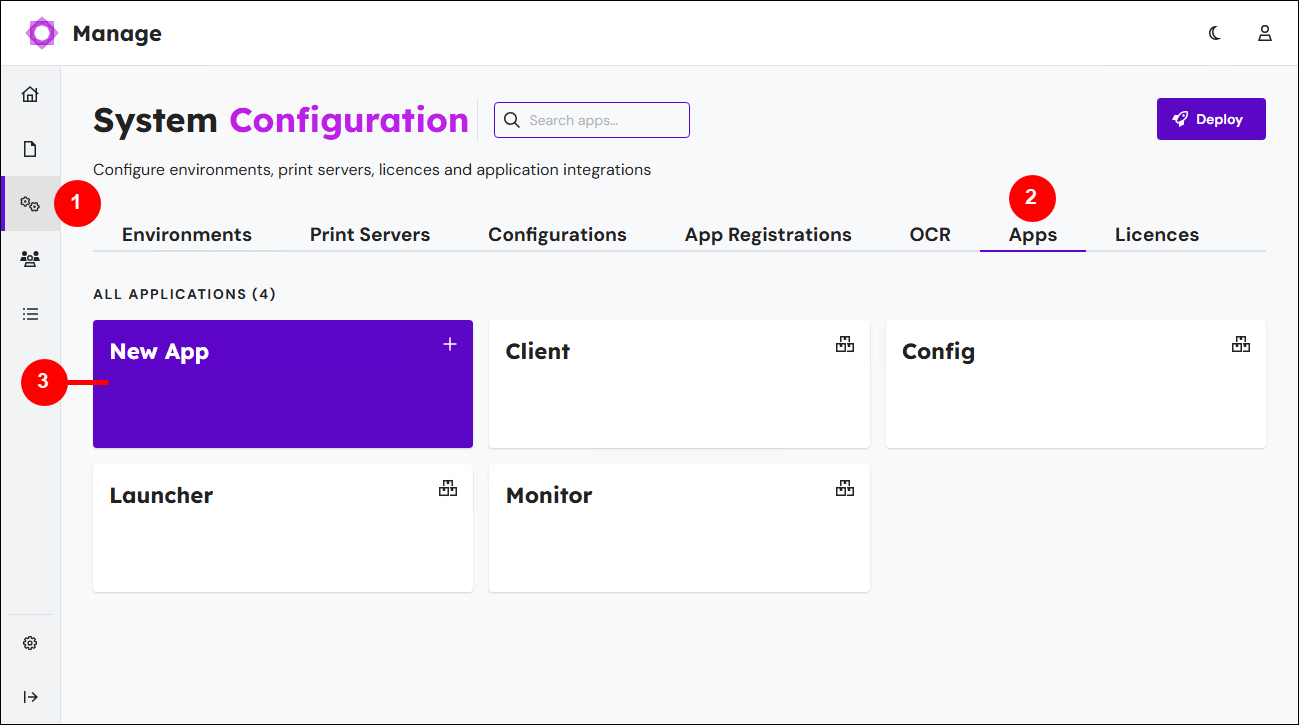
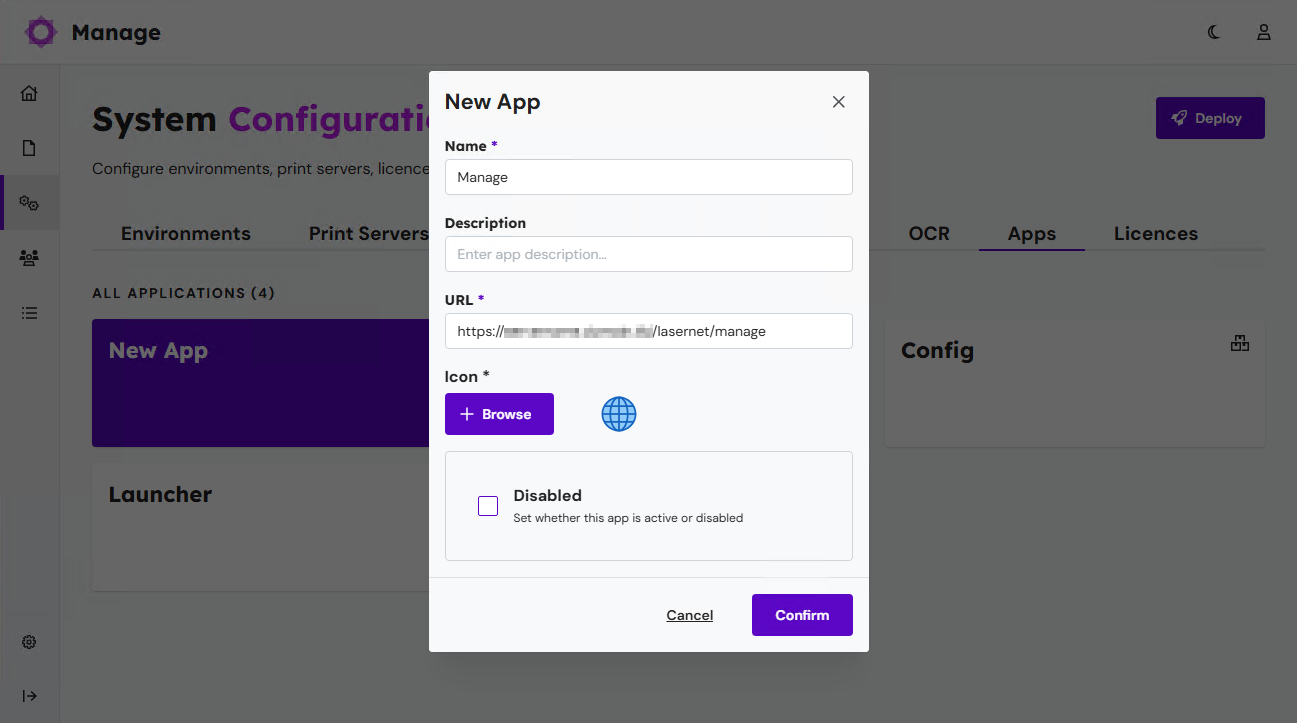
In the New App window:
Enter Manage as the app’s Name.
Enter
https://<FQDN of Lasernet Config server>/lasernet/manageas the app’s URL. Appropriately substitute<FQDN of Lasernet Config server>.Important
You must use the fully qualified domain name of the Lasernet Config server.
Click Confirm. Lasernet Manage adds the app to the Apps page.
Test the Workaround
On another computer on the network, go to https://<FQDN of Lasernet Config server>/lasernet/manage. Appropriately substitute <FQDN of Lasernet Config server>.
If the workaround has been successfully applied, Lasernet Manage will load.
How to Get Support
If you encounter difficulty using Lasernet, contact us via the Create Ticket button in the support portal.