Error Message: 'Query Filter Cannot Be Specified on a Query that Are Split into Multiple Queries Dues to 1:n Fetch Model'
- 12 Feb 2026
- 2 Minutes to read
- Contributors

- Print
- PDF
Error Message: 'Query Filter Cannot Be Specified on a Query that Are Split into Multiple Queries Dues to 1:n Fetch Model'
- Updated on 12 Feb 2026
- 2 Minutes to read
- Contributors
- Print
- PDF
Article summary
Did you find this summary helpful?
Thank you for your feedback
When running a report, the following error may occur:
Error
Query filter cannot be specified on a query that are split into multiple queries dues to 1:n fetch mode.
This error message is also shown in Lasernet FO Connector 6 when configuring a query (within the Query group > Dialog setup > Default ranges and in Form links > Dialog setup > Default ranges).
It is similar to the following error message:
Error
1:N Fetch Mode is not allowed on Datasource having join condition with node other than its immediate parent.
The error occurs when adding a filter in the Query Wizard, Dialog Setup and/or the Default Ranges. The issue only occurs if the query contains two or more data source structures with at least one Fetch Mode/Fetch set to 1:N (One2Many).
The following is an example containing two data-source-structures:
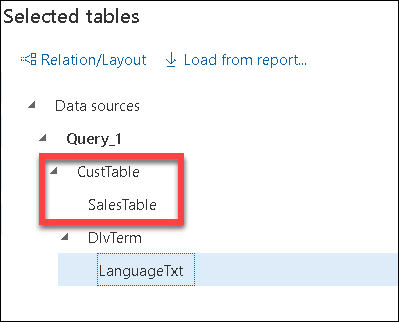
A. Containing the data sources/tables CustTable and SalesTable.
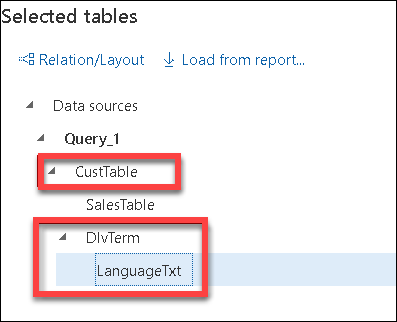
B. Containing the data sources/tables CustTable, DlvTerm, and LanguageTxt.
Data source structure A:
Data source structure B:
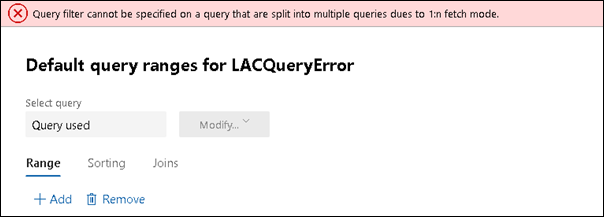
Adding a filter in Lasernet FO Connector 6 would display the following error message:
Error
Query filter cannot be specified on a query that is split into multiple queries dues to 1:n fetch mode.
A similar error is shown in Lasernet FO Connector 5 when running the report.
Solution
There are three ways to resolve the issue, as follows:
Change the Query Structure
Restructure the query. It should be possible to have all the required data sources within the same data source structure as follows:
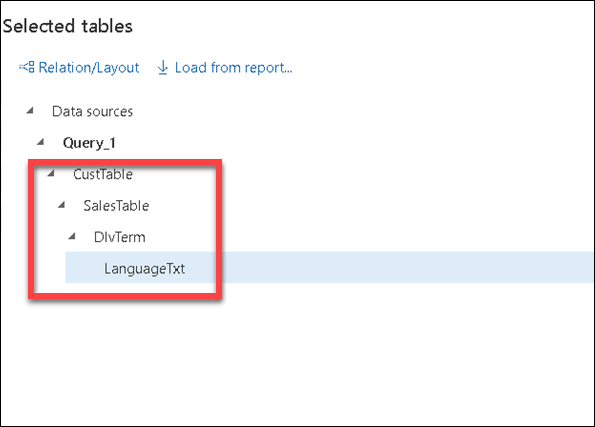
Having all data sources in the same structure would not cause the error when using 1:N in the Fetch Mode/Mode.
This approach also avoids the issue in relation to the row size when having a lot of data sources/tables (issue caused by 1:1).
Change 1:N to 1:1
Change 1:N to 1:1 in the Fetch Mode/Fetch, but this could cause the following error if many tables are joined together:
Error
[Microsoft][ODBC Driver 17 for SQL Server][SQL Server]Cannot create a row of size 8061 which is greater than the allowable maximum row size of 8060.
This error is only displayed if the query contains a lot of data sources/tables, and why Fetch Mode/Fetch 1:1 works in most cases.
Add a Range instead of a Filter (Lasernet FO Connector 6)
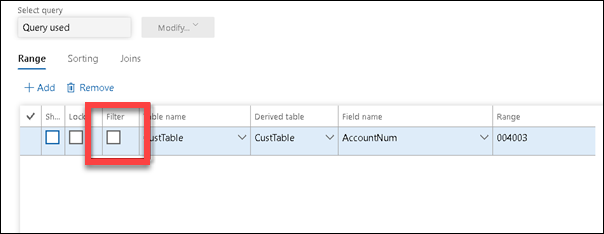
Lasernet FO Connector 6 contains the option to add a range instead of a filter by clearing the Filter checkbox in the Ranges in Dialog Setup, Ranges in the Form Links, and/or in the Ranges in the Query Wizard.
Clearing the Filter checkbox will fix the issue and enable multiple query structures with 1:N relationships in the Fetch Mode/Fetch.