Develop SOAP Web Services (Server)
- 15 Apr 2026
- 7 Minutes to read
- Contributors

- Print
- PDF
Develop SOAP Web Services (Server)
- Updated on 15 Apr 2026
- 7 Minutes to read
- Contributors
- Print
- PDF
Article summary
Did you find this summary helpful?
Thank you for your feedback
Applies to: Lasernet Core 10, Lasernet Core 11
Note
For information about creating REST web services, see Web Server (input module).
A web service enables two computers to communicate over a network in a client-server model. A SOAP web service provides an interface (API), which is described in a machine-processable format called Web Services Description Language (WSDL). The computer hosting the web service is the server; the computer interacting with the server is the client.
Note
The screenshots in this section are from Lasernet 10.
Web Service Interface
A web service interface consists of one or more methods (which in other programming contexts are termed subroutines, procedures, or functions).
A method:
Has zero or more input parameters
Can return a result to the client
Defines what Lasernet Core does when a client makes a request to that method.
The method’s input parameters and the result that it turns to clients can use a range of built-in data types (such as string, integer, and Boolean ) or an explicitly defined custom data type.
Lasernet Core as a SOAP Web Service Server
You can use Lasernet Core to create SOAP web services. Each Web Server input module in a configuration defines a distinct web API. To create multiple web APIs, add multiple Web Server input modules to the Lasernet Core configuration.
The Name of a Web Server module defines the name of the API that the module creates. The configuration of the module defines the methods that the API provides to clients.
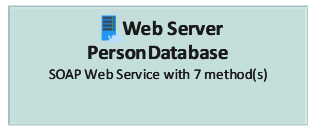
For example, this Web Server module defines a PersonDatabase API:
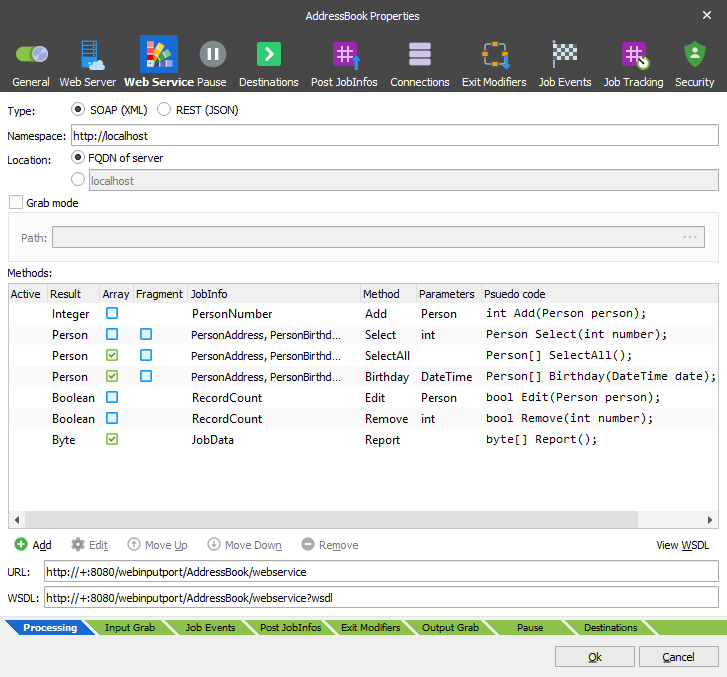
The Methods area of the module’s Web Server tab defines the methods that the API provides:
Complex Data Types
You can create complex data types. These enable you to create data structures that represent data in a way that simple, standard data types (such as String and integer) cannot do alone.
A complex data type can be a record (a collection of variables) or an enumeration (which consists of a set of named integral constants that are known as enumerators).
Record
When you create a record, each variables that you add to it can be of one of the following standard data types:
String. A sequence of characters.
Byte. An integer value between 0 and 255.
Integer. An integer value between -2147483648 and 2147483647.
Boolean. True/False value. ‘True’ and ‘1’ is considered true and everything else is false.
Double. ±5.0 × 10−324 to ±1.7 × 10308. Precision of 15-16 digits.
DateTime. From 12:00:00 midnight, January 1, 0001 Anno Domini (Common Era) through 11:59:59 P.M., December 31, 9999 A.D. (C.E.).
Lasernet Core also has a special data type called JobInfo which contains a key/value pair.
It is also possible to define custom data types, like ‘Person’ in our example:
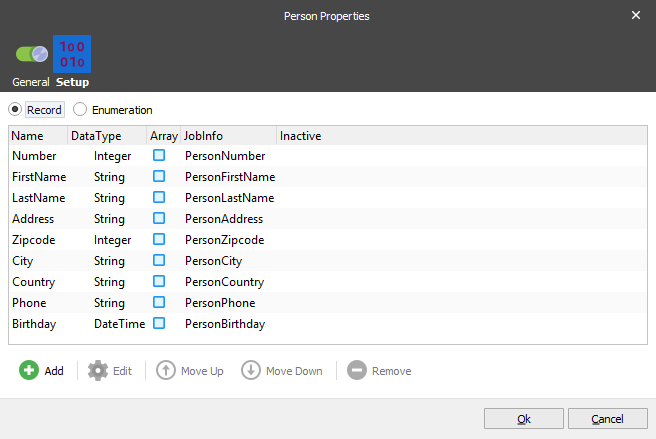
The example Person data type (in the image above) contains several variables, which have different data types: Number, FirstName, LastName, Address, Zipcode, City, Country, Phone and Birthday.
To store binary data, like a file, use an array of bytes. The JobData of a Job in Lasernet Core is a byte array.
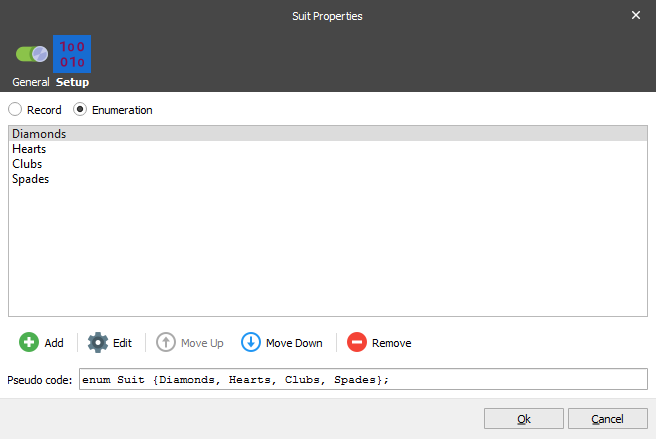
Enumeration
An enumeration is a list of strings. An enumeration can be used for both the parameters of a method and for the result.
Parameters
Each method in the API has its own parameter profile. Parameters can be a simple standard data type (string, integer etc.) or a custom user defined data type like ‘Contact’.
Reference Parameter (SOAP only)
The value of reference parameters are included in the Web Service module’s response. If the value of the JobInfo that is specified as the method’s result does not provide sufficient information alone, consider specifying that some parameters are reference parameters. Their values will be included in the XML returned to the client.
Only the simple standard data types can be used as reference parameters.
Array Parameters
Parameters can be marked as ‘array’ to allow the input of multiple values of the same data type.
JobInfo Data Type
Passing metadata to Lasernet Core can be done via the JobInfo data type. Passed JobInfos are not mapped to any specific JobInfo but use the key of the passed JobInfo. Be sure not to overwrite or append to existing JobInfos. Use a prefix where possible. Also take note that keys are not Lasernet Core system keys (for example JobID, PublicID etc).
Complex Data Type
When returning a custom data type from Lasernet Core, this is considered a complex data type in some cases. The result itself can be an array, or the result can contain multiple arrays. These can be custom data types also.
Complex Data Types can be handled in two ways. Either save the data structure as an XML fragment, or map JobInfos into the structure if possible.
An XML fragment can be used as a template in the Form Editor, allowing the user to build up a complex result. This result must be placed in the JobInfo that is returned from the method when the Fragment flag is checked.
Result
Each method has its own result. This result can either be nothing (none or void), or a built in / custom data type.
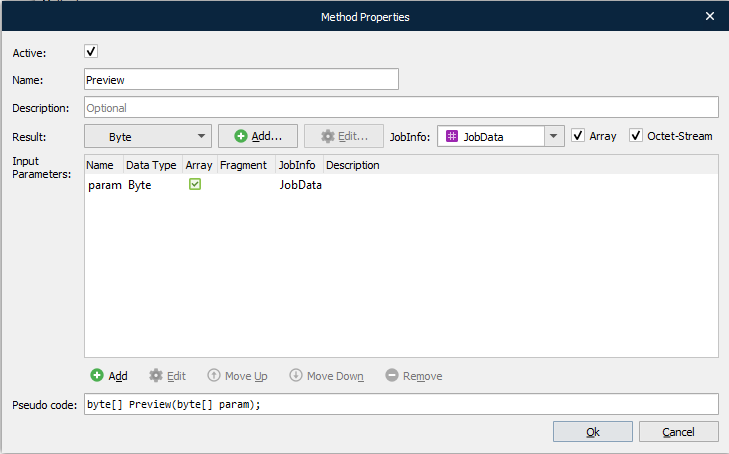
Lasernet Core is able to return a list of results in an array as seen in the ‘Birthday’ method:
What Happens in Lasernet Core When a Method is Called
After transferring the configuration containing the defined API, the log will show that the web server is ready to process requests:

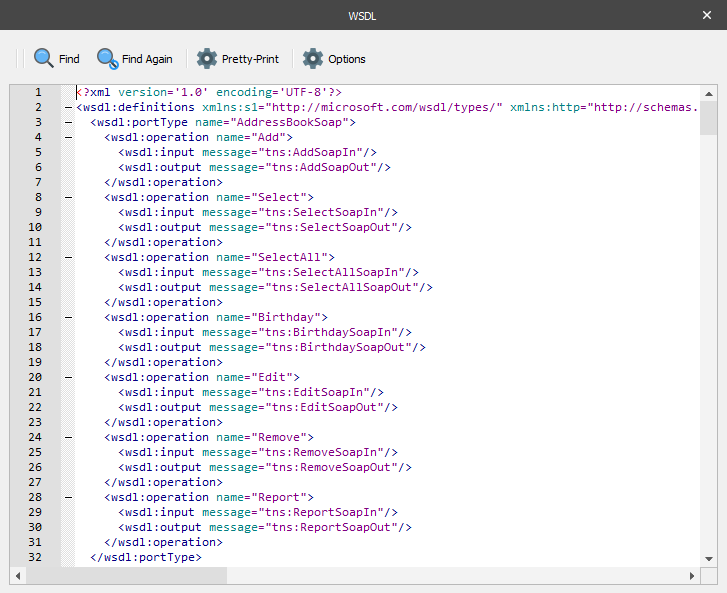
The WSDL file of the Web service can be downloaded or referenced in the client software; either via the url with wsdl query parameter, or by clicking Save WSDL button in Lasernet Developer.
When Lasernet Core receives a request, a Lasernet Core Job is created and the method called is decoded from the SOAP request.
The method name is written to the ‘WebserviceMethod’ JobInfo of the Job.
Passed parameters are read into the mapped JobInfos of the Job.
The Job is then passed to the modifiers and destinations of the Web Server module.
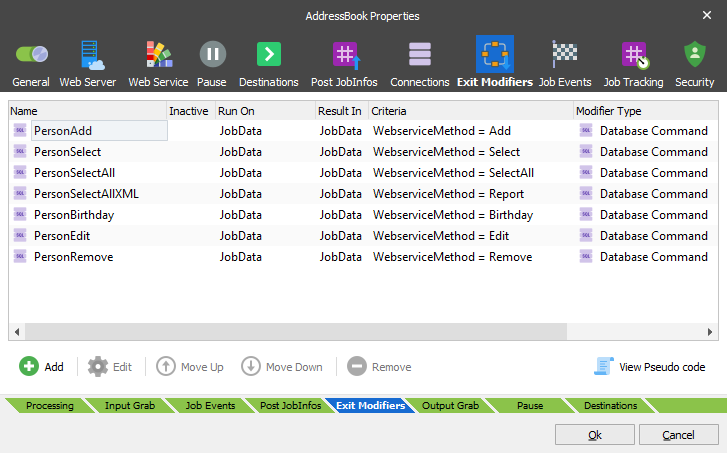
Some methods might need to do advanced logic and processing. For this, the scripting functionality of Lasernet Core can be handy. Script functions can be called as modifiers, working as method handlers using the JobInfo criteria on the WebserviceMethod JobInfo.
How and When Does Lasernet Core Respond to the Client?
Because web service method calls are blocking, it is important that Lasernet Core responds as soon as possible.
Lasernet Core is told to generate the response to the client, when a Job is passed to a special destination called Webservice. This is required and must be done as soon as possible so that the caller blocks for as short a period as possible, and to avoid timing out.
The virtual Webservice destination can be called from either the Destinations list of the object, or from a script:
job.addDestination("Webservice");
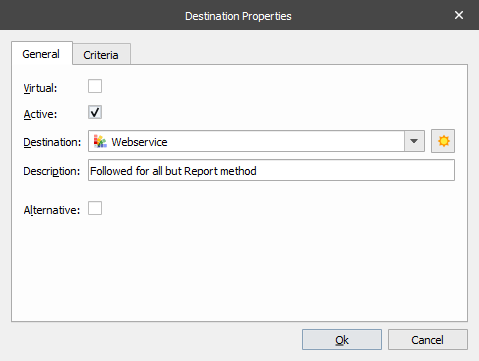
Any JobInfos needed for the response must be set before passing the Job to the Webservice destination.
For example, the following Preview method generates and returns a PDF file.
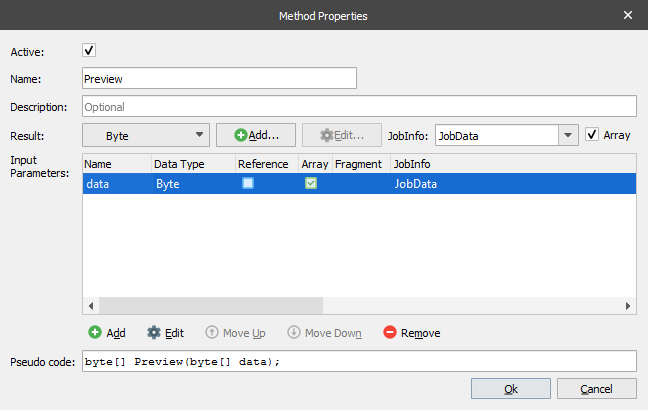
This will return as soon as the PDF has been generated by the PDF engine.

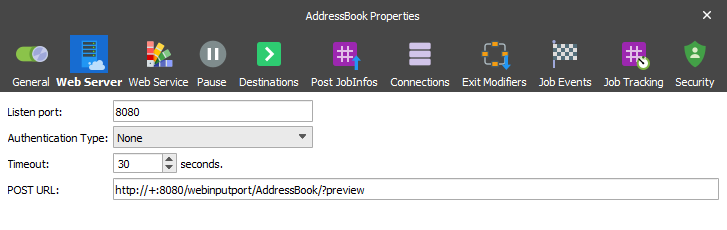
A timeout is defined both in the client and the server. Lasernet Core has a default and configurable 30-second timeout. If the Job has not been passed to the ‘Webservice’ destination within 30 seconds of receiving the request, a SOAP fault will be returned to the client.
Consuming the Web Service
The Web service can be used from any client which is able to communicate via web services. Lasernet Core itself can be a client via the Web Service module.
Using .NET to consume the web service can be a simple, yet powerful way of integrating with Lasernet Core.
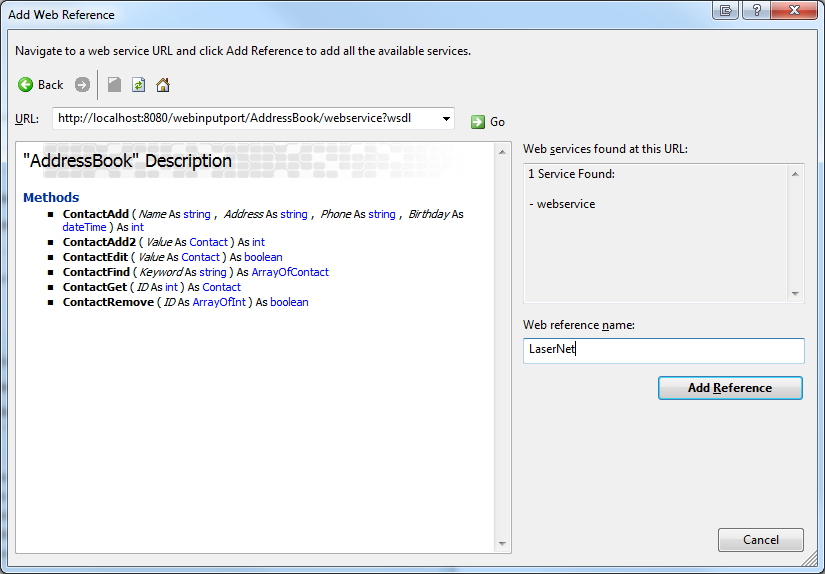
Notice how Visual Studio finds the exposed methods, their parameter profiles and generates code which is able to talk to Lasernet Core.
Calling a method in the Web service is now as simple as a few lines of code;
LaserNet.AddressBook ws = new LaserNet.AddressBook();
ws.Url = "http://localhost:8080/webinputport/AddressBook/webservice";
int contactID = ws.ContactAdd(
      /*Name*/"Jacob Pedersen",
      /*Address*/"South of Heaven",
      /*Phone*/"1234",
      /*Birthday*/DateTime.Parse("1974-08-18T11:11")
);
Combining Multiple Jobs into a Single Web Service Response
If a method needs to return multiple processed Jobs in a single request, it is necessary to combine these Jobs into a single Job before sending that to the ‘Webservice’ destination.
The ‘Webservice’ destination uses the PublicID of the incoming request to know where to send the response. This means that multiple calls to the ‘Webservice’ destination, with the same PublicID, will result in an ‘Unknown destination’ error.
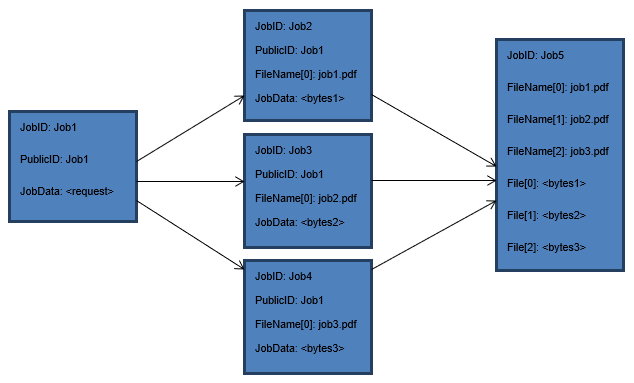
The way a method returns arrays is by using the JobInfo arrays. Therefore, we need to convert the combined Jobs into one Job, where JobInfos for each combined Job, are written to arrays on the combined outcoming Job.
The Pass-Through engine has this functionality. Enabling combining on a Pass-through engine will make it automatically combine on ‘PublicID’. If possible, set a combiner stop criterion, so Lasernet Core does not have to wait for a timeout. This will help Lasernet Core respond as soon as possible to the client.
The outcoming combined Job from the Pass-Through engine will be a clone of the first incoming Job. The JobInfo arrays radio button makes it possible to specify a list of JobInfos which will be copied from each incoming Job into arrays on the outcoming Job.
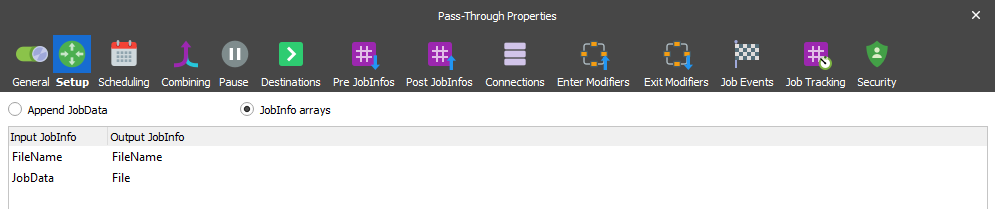
As an example, take a request which results in 3 incoming Jobs which will be combined into 1 outcoming Job to be passed to ‘Webservice’ destination:
The Data Type profile is defined as follows:
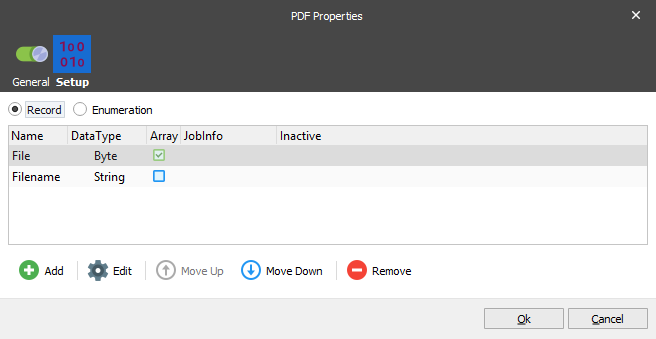
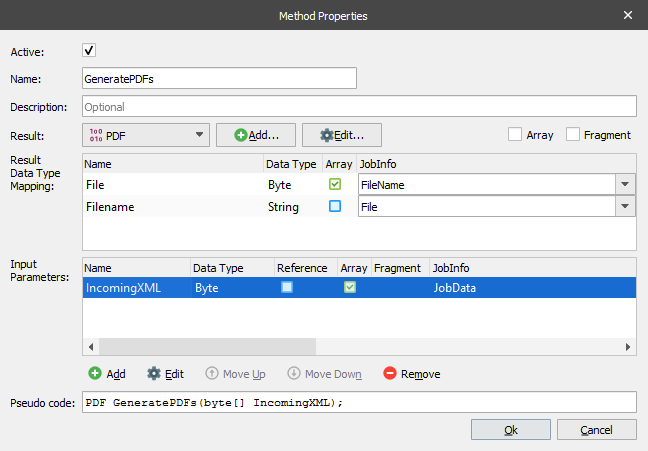
Settings for the method to output an array of PDFs that maps the two JobInfo arrays from the Pass-Through engine: